Documentation-Specific
Tools for rendering, exploring, and maintaining API documentation. From interactive specification viewers to automated style checkers, this section covers the platforms that help teams create accurate, consistent, and developer-friendly API documentation.
API playground
Definition: interactive environment embedded in API documentation that lets developers send real requests to endpoints and view live responses directly in the browser, without setting up a local development environment
Purpose: lowers the barrier to API adoption by letting developers test endpoints, experiment with parameters, and see immediate results from within the documentation itself; reduces the feedback loop between reading about an API and understanding how it actually behaves; documentation platforms like Mintlify and Zuplo generate API playgrounds automatically from OpenAPI specifications, keeping the interactive environment in sync with the API as it changes
API playground vs related tools
| API playground | Developer portal | API sandbox | |
|---|---|---|---|
| Scope | single interactive feature | broad destination with many components | controlled testing environment |
| Contains | live request/response testing | docs, tutorials, forums, analytics, playgrounds | simulated or limited data |
| Oversight | minimal | varies | provider-monitored |
| Relationship | component of a portal | may include a playground | alternative to playground for safer testing |
Example: within an API playground, a developer reading about the POST /charges endpoint
can enter test values for amount, currency, and a test card token directly in the pages,
submit the request, and see the full JSON response — including headers and status codes — without
leaving the docs or writing a single line of code
Related Terms: API, API endpoint, API sandbox, developer portal, HTTP status codes, JSON, Mintlify, OpenAPI Specification, Swagger
Sources:
- Hygraph: "API Playground"
- Mintlify, Document APIs: "Playground"
- Zuplo: "New API Playground in the Zuplo Developer Portal" by Nate Totten
API sandbox
Definition: isolated testing environment that simulates a production API's behavior using mock data and predefined responses, allowing developers to experiment with endpoints and test integrations without affecting live systems or real user data
Purpose: enables developers to safely build, test, and troubleshoot API integrations before deployment; reduces the risk of errors reaching production by providing a controlled space to validate authentication flows, error handling, and edge cases; API docs writers reference sandboxes when writing getting started guides and tutorials, directing readers to sandbox credentials and endpoints so they can follow along without production access
API sandbox vs API playground
| Aspect | API Sandbox | API Playground |
|---|---|---|
| Purpose | Integration development and pre-deployment testing | Quick, exploratory testing of individual endpoints |
| Audience | Developers building integrations | Developers reading and learning from docs |
| Environment | Persistent, isolated environment mirroring production infrastructure | Lightweight, browser-based tool embedded in docs |
| Workflow Support | Full development workflows | Docs comprehension |
| Maintainers | API provider | Typically built into docs platform |
Example: a fintech company building on a payments API receives sandbox credentials — a test API key and a dedicated sandbox base URL — from the provider; devs use these credentials to simulate payment flows, trigger error responses like declined cards or insufficient funds, and validate their integration logic against realistic scenarios before pointing their app at the production environment; the sandbox explains how to access test credentials, which endpoints are available, and how simulated responses differ from live ones
Related Terms: API documentation testing, API playground, developer portal, docs-as-code, DX, getting started, OpenAPI Specification, reference, tutorial
Sources:
- Katalon: "What is API Sandbox? Definition, Examples, Key Components, Benefits"
- SmartBear Software: "What Is an API Sandbox?"
- WireMock Inc., WireMock Cloud: "API Sandbox: Definition, Core Features, and When to Use Mocks Instead"
Astro
Definition: open source web framework that uses islands architecture to deliver fast, content-focused websites by rendering pages to static HTML and selectively hydrating interactive components with JavaScript only where needed
Purpose: enables API docs teams to build performant docs sites with minimal JavaScript overhead; supports multiple UI frameworks React, Vue, Svelte within the same project, allowing teams to use familiar tools while maintaining excellent performance; Starlight theme provides docs-specific features like automatic navigation, search, and internationalization out of the box
Example: A technical writing team builds a developer portal using Astro with Starlight;
1. Write docs in Markdown with frontmatter for metadata
2. Creates interactive API examples using React components - code playgrounds, response visualizers
3. Adds Vue-based configuration builders for complex endpoint customization
4. Astro renders everything to static HTML, only loading framework code for interactive islands
5. Deploys to a CDN with sub-second page loads despite rich interactivity
Related Terms: docs-as-code, Docusaurus, Markdown, MDX, MkDocs, static site generator
Sources:
- Astro Homepage: "The web framework for content-driven websites"
- Astro, Starlight: "Make your docs shine with Starlight"
CCMS
Definition: acronym for component content management system; platform that manages documentation at the component level with individual topics, procedures, parameters, warnings, or assets, rather than at the document level; each component is stored once and reused by reference across multiple documents and outputs; commonly built on XML-based structured authoring standards, most often DITA — Darwin Information Typing Architecture — or DocBook
Purpose: enables API docs teams managing large, multi-product, or multi-audience content sets to maintain a single source of truth for shared components, as in parameter descriptions, authentication procedures, error code tables, and publish them across reference docs, getting started guides, SDK documentation, and localized outputs simultaneously; when a shared component changes, the update propagates automatically to every document that references it, eliminating the copy-paste drift that degrades accuracy across large documentation sets; supports structured authoring workflows, granular version control at the component level, and conditional publishing for audience- or product-specific output variants
CCMS vs CMS
| Aspect | CCMS | CMS |
|---|---|---|
| Content Unit | Individual Components: topics, paragraphs, assets | Full pages or documents |
| Reuse Model | Reference-based: one source, many outputs | Copy-based: content duplicated across pages |
| Structure | Requires structured authoring: DITA, DocBook XML | Supports unstructured or lightly structured content |
| Version Tracking | Per-component lifecycle: owner, version, approval tracked individually | Per-page, per-document versioning |
| Publishing | Multi-channel output, single component set: print, web, PDF, e-reader | Primarily web publishing |
| Primary Users | Technical writers managing complex, multi-product docs | Content creators, marketers, web managers |
| API Docs Use Case | Managing shared parameter definitions, procedures, error references across many docs | Managing endpoint reference pages, tutorials, guides as discrete pages |
| Tools | Heretto, MadCap IXIA CCMS, Componize, XDocs | Contentful, Strapi, WordPress |
Example: an API doc team maintains a shared auth-flow component describing
the OAuth 2.0 authentication flow; the component is referenced in the getting
started guide, the API reference, the SDK docs for three languages, and the
localized Japanese output. When the auth flow changes, a writer updates the single
component and the CCMS automatically propagates the update to all seven outputs;
the same team uses a CCMS to conditionally publish product-tier variants, filtering
components by metadata so Enterprise and Developer plan docs render from the same
component library with different content visible per audience
Related Terms: CMS, content, DAM, docs-as-code, information architecture, knowledge management, metadata, partials, structured content, taxonomy, version control
Sources:
- Heretto Intellectual Property, Content Ops: "What Is a Component Content Management System (CCMS)?" by Ren Taylor
- Wikipedia: "Component content management system"
CMS
Definition: acronym for content management system; software platform that enables teams to create, organize, store, and publish content without requiring direct code or database manipulation
Purpose: centralizes content management, enables collaboration among multiple contributors, and supports structured content workflows in API documentation projects; not interchangeable with but complements a DAM, digital asset management system, and commonly uses some version control under the hood, abstracted away for user-friendliness
CMS vs DAM
| Aspect | CMS | DAM |
|---|---|---|
| Primary Purpose | Create, edit, and publish web content and documentation | Store, organize, and distribute media files and digital assets |
| Content Types | Text-based content, structured documentation, web pages | Images, videos, audio files, diagrams, downloadable files |
| Key Features | Page templates, content workflows, publishing controls | Advanced metadata, version control, usage rights management |
| Common Users | Technical writers, content creators, web managers | Creative teams, marketing teams, asset managers |
| API Docs Use Case | Managing endpoint reference pages, tutorials, guides | Managing architecture diagrams, video tutorials, screenshots |
| Tools | Contentful, Strapi, WordPress, Docusaurus | Bynder, Adobe Experience Manager, Cloudinary |
CMS vs version control
| Aspect | Version Control - Git | CMS |
|---|---|---|
| What It Tracks | File-level changes, commits, branches | Content versions, publishing states, editorial workflows |
| Who Uses It | Developers, technical writers comfortable with CLI | Writers, marketers, non-technical contributors |
| Interface | Command line, Git clients | Web-based GUI, WYSIWYG, What You See Is What You Get, editors |
| Collaboration Model | Branch/merge workflows, pull requests | Editorial workflows, review/approval states |
| Version History | Complete file history, diffs, blame | Content revisions, rollback, scheduled publishing |
| Publishing | Requires build process, deployment | Often has built-in publishing capabilities |
Example: using a headless CMS like Contentful or Strapi, a technical writer edits API endpoint documentation through a web form interface, saving drafts that are version-tracked automatically; meanwhile, engineers can access the same content via API for integration into SDK documentation, and the CMS handles publishing to production without requiring writers to use Git commands
Related Terms: CCMS, content, DAM, docs-as-code, Git, GUI, knowledge management, metadata, SDK, structured content, version control
Sources:
- IBM: "What is a content management system (CMS)?" by Teaganne Finn, Amanda Downie
- Wikipedia: "Content management system"
DAM
Definition: acronym for digital asset management; software platform and business process for storing, organizing, managing, retrieving, and distributing digital files such as images, videos, audio, graphics, and other media assets
Purpose: provides centralized repository for API documentation teams to manage visual and multimedia assets - architecture diagrams, tutorial videos, screenshots, code examples, logos, and downloadable files - enabling version control, brand consistency, and efficient reuse across documentation, marketing, and developer relations materials
DAM vs CMS
| Aspect | DAM | CMS |
|---|---|---|
| Primary Focus | organizing and distributing media files | creating, editing, and publishing structured text content |
| Content Types | images, videos, downloadable assets | web pages and structured documentation |
| Key Capabilities | advanced metadata tagging and asset version control | content editing, workflow approval, and page publishing |
| Role in API docs | manages visual assets referenced within documentation | manages the documentation pages themselves |
| Typical Use Together | source for images, diagrams, and downloadable SDKs | authoring environment for the documentation that references those assets |
Example: Cloudinary Media Library with API Docs Glossary asset organization
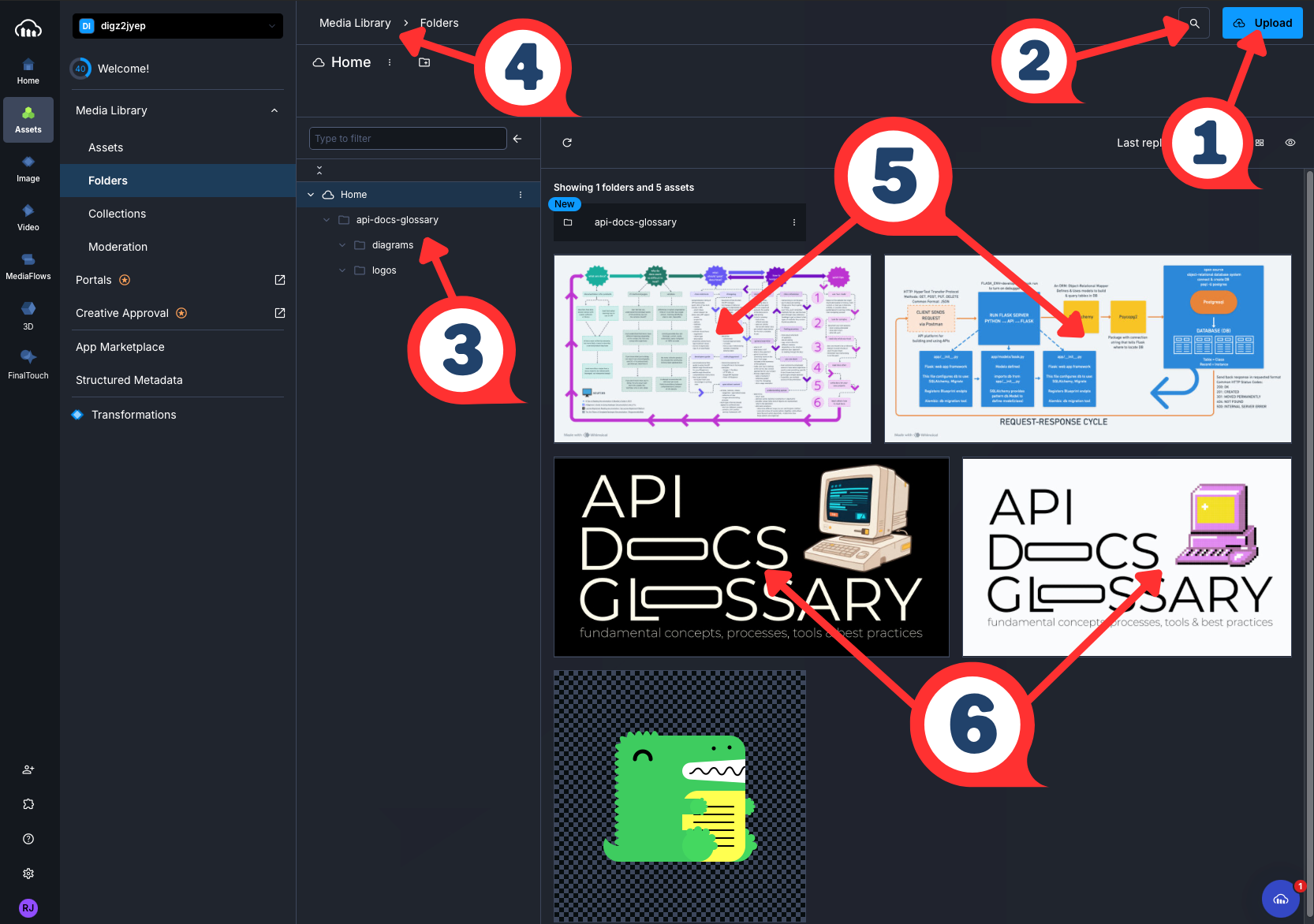
| # | Element | What It Demonstrates |
|---|---|---|
| 1 | Upload Button | Asset Ingestion - where new files enter the DAM |
| 2 | Search Icon | Metadata-Driven Retrieval - find assets without manual browsing |
| 3 | Folder Tree | Taxonomy - project-scoped folder hierarchy organizes assets by type |
| 4 | Breadcrumb Path | Navigation - locates assets within the broader library structure |
| 5 | Architecture Diagrams | Reusable Assets - single source referenced across multiple docs pages |
| 6 | Dark/Light Logos | Asset Variants - theme variants managed as a set |
Related Terms: CCMS, content, CMS, docs-as-ecosystem, knowledge management, metadata, taxonomy
Sources:
- Cloudinary: "An Overview of Digital Asset Management (DAM) Systems: Basics and Beyond"
- IBM: What is Digital Asset Management?
developer portal
Definition: centralized, web-based platform where API providers publish documentation, code samples, SDKs, tutorials, and support resources for developers who want to discover, learn, and integrate with their APIs
Purpose: serves as the primary interface between an API provider and its developer audience; consolidates everything a developer needs — reference docs, getting started guides, authentication instructions, API playgrounds, sandbox access, versioning information, and community resources — into a single destination; reduces time-to-first-API-call and lowers the support burden on the API provider by enabling developer self-service; for tech writers, the developer portal is the publishing target and organizational framework that shapes how docs are structured and what content gets prioritized
Why this belongs in Tools & Techniques > Documentation-Specific:
describes a platform that tech writers and developers actively publish to,
maintain, and design content for — it's a docs infrastructure tool, not an
abstract API concept; placing it alongside API playground, API sandbox,
Mintlify, and OpenAPI Specification keeps the
cluster of docs publishing and DX tools together; Core Concepts covers what
APIs fundamentally are, while the developer portal is a tooling and workflow
concern that's about how teams publish and present API docs to the world
developer portal vs API docs
| Aspect | API Docs | Developer Portal |
|---|---|---|
| Definition | The content itself — reference material, guides, and examples explaining how an API works | The platform that hosts and organizes that content alongside other resources |
| Dependency | Can exist without a portal | Defined by the docs and tooling it surfaces |
| Scope | The content layer | Contains API docs plus additional tooling |
Example: a tech writer adding docs for a new payment method publishes directly to the portal, where it immediately becomes discoverable alongside authentication guides, error code references, and getting started tutorials — devs never need to leave the portal to get from "what is this API?" to a working integration
Related Terms: API playground, API sandbox, docs-as-code, DX, getting started, GitBook, Mintlify, OpenAPI Specification, reference, SDK, Tome, tutorial
Sources:
- Moesif: "What is an API Developer Portal? The Ultimate Guide"
- Pronovix: "What is the Difference Between API Documentation and a Developer Portal?" by Kathleen De Roo
- Solo.io: "API Developer Portals: Empowering Developers with APIs"
Docusaurus
Definition: open source static site generator built by Meta; creates docs websites with built-in versioning, search, and internationalization
Purpose: streamlines API docs site creation by providing React-based theming, MDX support for interactive components, automatic sidebar generation from file structure, and native OpenAPI integration; reduces setup complexity compared to general-purpose static site generators while maintaining flexibility for customization
Docusaurus Ecosystem:
- Docusaurus Core - static site generator with docs-focused features
- docusaurus-plugin-openapi-docs - Palo Alto Networks plugin that generates API reference docs from OpenAPI specifications, creating flexible API docs compatible with Docusaurus
- MDX - Markdown format that supports embedded React components
Example: developer docs portal workflow -

Related Terms: Astro, docs-as-code, Fumadocs, GitHub Pages, Markdown, MDX, MkDocs, Nextra, OpenAPI Specification, static site generator
Sources:
- Kovai.co, Document360: "What Should You Consider When Choosing Docusaurus?" by Arunkumar Kumaresan
- Meta Platforms, Inc.: Docusaurus Homepage
Falconer
Definition: AI-powered knowledge platform that maintains synchronized internal engineering docs by integrating with GitHub, Linear, and Slack
Purpose: prevents internal docs from drifting out of sync with codebases as engineers ship features; provides AI-powered search and question-answering across organizational knowledge, tacit information, and code repositories
Why this belongs in Tools & Techniques: Falconer is specifically for
internal docs management, not an AI concept, methodology, or technology that
impacts how technical writers work with APIs; AI & APIs category covers AI
concepts and terminology relevant to API docs work - prompt engineering,
retrieval-augmented generation, or AI-assisted usability analysis - while Falconer
is a general-purpose internal knowledge management platform that happens to use AI;
comparable to how Notion or
Confluence
are collaboration tools with AI features rather than AI technologies themselves
Example: internal docs integration workflow with Falconer -

Related Terms: docs-as-code, docs-as-ecosystem, domain knowledge, Git, GitHub, Inkeep, Linear
Sources:
- Falconer Homepage: "The source of truth for high-speed teams"
- Write the Docs community discussion, January 2026
Fern
Definition: open source toolset acquired by Postman in January 2026; automatically generates type-safe SDKs in multiple languages and interactive API docs from AsyncAPI, Fern definition, gRPC, and OpenAPI specs
Purpose: streamlines docs-as-code workflows by maintaining a single source of truth; ensures code examples, docs, and SDKs stay synchronized as APIs evolve; reduces manual SDK maintenance across many programming languages to enhance DX, developer experience
Example: Fern workflow with OpenAPI specs -

Related Terms: AsyncAPI, CI/CD pipeline, docs-as-code, DX, gRPC API, Inkeep, OpenAPI Specification, Postman, SDK, Speakeasy
Sources:
- Fern, Birch Solutions: "Instant Docs and SDKs for your API"
- GitHub Repository: fern-api/fern
- Postman, Inc.: "Postman acquires Fern" by Abhinav Asthana
Fin
Definition: Intercom's AI customer support agent that resolves technical questions using information from docs, help centers, and support tickets
Purpose: automates customer support responses for API products by parsing context from existing docs and providing accurate answers; reduces support team workload while maintaining quality through AI training on company-specific knowledge base
Example: SaaS company with API product integrates Fin to handle common developer questions such as "What's my rate limit?" or "How do I generate an API key?" using answers from their API docs
Related Terms: docs-as-ecosystem, domain knowledge, DX, Falconer, Fern, Fin, Inkeep, Kapa.ai, RAG
Sources:
- Intercom, Fin Homepage: "The #1 AI Agent for all your customer service"
- PixieBrix, Inc.: "What is Intercom Fin? Benefits, use cases, and alternatives"
Fumadocs
Definition: open source React.js docs framework built by Fuma Nama; generates docs sites with MDX support, built-in search, OpenAPI playground, and composable UI components; works with Next.js, TanStack Start, React Router, and Waku
Purpose: gives engineering-leaning docs teams a headless, composable alternative
to opinionated platforms like Docusaurus; separates
content - fumadocs-mdx, core logic - fumadocs-core, and UI - fumadocs-ui, into distinct
layers so teams can adopt the pieces they need without committing to the full framework;
fumadocs-openapi extends the framework to render OpenAPI specifications as interactive
API reference docs; supports MDX content with
TypeScript Twoslash for inline type
information in code blocks, making it well-suited for documenting SDKs and typed APIs
Fumadocs vs Docusaurus
| Aspect | Fumadocs | Docusaurus |
|---|---|---|
| Framework Dependency | React.js framework-agnostic — Next.js, TanStack Start, Waku | React-based SSG built and maintained by Meta |
| Architecture | Headless, composable — use content, core, and UI layers independently | Opinionated, batteries-included |
| Setup Approach | Compose from packages; requires React/Next.js familiarity | Preconfigured; lower barrier for non-engineers |
| Customization | High — swap UI layer entirely, integrate any CMS | Moderate — theme swizzling, plugin system |
| OpenAPI Support | fumadocs-openapi plugin | docusaurus-plugin-openapi-docs by Palo Alto Networks |
| Best For | Engineering teams with React/Next.js workflows | Broader teams including non-engineer contributors |
Example: a developer tools company building on Next.js initializes a Fumadocs
project with pnpm create fumadocs-app, adds fumadocs-openapi to render their
OpenAPI spec as an interactive reference, and extends the UI layer with custom
components without modifying the core content pipeline
Related Terms: docs-as-code, Docusaurus, MDX, MkDocs, OpenAPI Specification, static site generator
Sources:
- Fumadocs Homepage: "Build excellent documentations, your style"
- GitHub Repository: fuma-nama/fumadocs
GitBook
Definition: cloud-based docs platform that combines a WYSIWYG editor with GitHub and GitLab sync, publishing polished docs sites for public developer portals, API references, help centers, and internal knowledge bases
Purpose: bridges the gap between technical and non-technical contributors by supporting both Git-based workflows and a visual editor on the same platform; engineers commit docs changes through GitHub or GitLab sync while writers and product managers use the WYSIWYG interface — both workflows publish to the same destination; GitBook Agent proactively surfaces improvement suggestions to keep docs aligned with product changes; the built-in AI Assistant answers reader questions using the published docs content; positions itself explicitly as the buy-vs-build alternative for teams that have outgrown custom docs infrastructure
GitBook vs Mintlify
| Aspect | GitBook | Mintlify |
|---|---|---|
| Primary Audience | Mixed teams — technical and non-technical contributors | Devs and API-first teams |
| Editor Experience | WYSIWYG + Git sync — contributors choose their preferred workflow | Docs-as-code first — MDX and OpenAPI in Git |
| OpenAPI Rendering | Supported | Core feature — auto-generates playground from spec |
| AI Features | GitBook Agent - maintenance suggestions + AI Assistant - reader Q&A | AI-assisted writing |
| Hosting | Managed cloud | Managed cloud |
| Best For | Teams with mixed tech audiences - help centers, internal knowledge bases | Teams publishing interactive API references |
Example: a small docs team uses GitBook to publish an external developer portal — engineers push API reference updates through GitHub sync, while a customer success writer updates the help center through the WYSIWYG editor; both workflows publish to the same GitBook site without requiring writers to learn Git
Related Terms: AI-assisted documentation, developer portal, docs-as-code, DX, Git, knowledge management, Mintlify, OpenAPI Specification
Source: GitBook Inc.: "Buy vs Build: Don't build a docs platform. Just create great docs."
GitHub Pages
Definition: free static site hosting service provided by GitHub that builds and deploys websites directly from a GitHub repository
Purpose: enables API docs teams to publish docs sites without managing servers or paying for hosting; integrates seamlessly with docs-as-code workflows by automatically deploying from repository branches, commonly used for open source project docs, API references, and developer portals
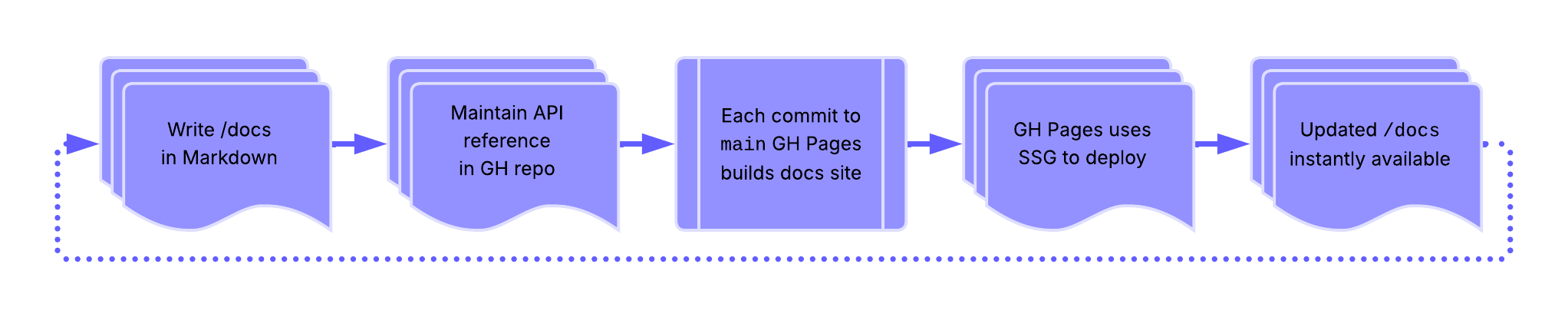
Example: GitHub Pages builds sites using Jekyll
or custom static site generator and deploys to username.github.io/repo-name -
Related Terms: docs-as-code, Git, GitHub, Markdown, MDX, static site generator
Sources:
Inkeep
Definition: AI-powered search and chat platform specifically designed to enhance docs discoverability; provides contextual answers from the docs, code repositories, and community discussions; similar AI-powered docs search tools include Fern's Ask Fern, Mendable and Markprompt, while traditional search solutions include Algolia DocSearch
Purpose: improves DX, developer experience by offering intelligent search that understands technical context and programming concepts; helps users find relevant API docs, code examples, and solutions without manually searching through multiple pages
Example: developer docs site integrates Inkeep's search widget, allowing users to search "rate limiting best practices" and receive synthesized answers from multiple docs sections plus relevant GitHub discussions
Inkeep vs Related Tools
These tools all help build and surface domain knowledge in API documentation, but through different approaches:
| Tool | Primary Function | Domain Knowledge Approach | Best For | Integration Level |
|---|---|---|---|---|
| Inkeep | AI-powered search and chat | Synthesizes answers from docs, repos, and discussions | Finding information across fragmented sources | Widget/embed in existing docs |
| Algolia DocSearch | Traditional search | Indexes docs content for fast keyword search | Fast, accurate keyword-based search | Widget/embed in existing docs |
| Falconer | Docs sync and consistency | Maintains single source of truth, auto-updates across platforms | Keeping docs synchronized and current | Integrates with Linear, Slack, docs platforms |
| Fern | Full docs framework | Generates docs from API definitions, includes Ask Fern AI chat, RAG-powered AI search that answers questions | End-to-end API docs automation | Complete docs platform replacement |
| Fin | AI customer support agent | Intercom ecosystem - resolves questions using docs, help centers, and support tickets | Companies already using Intercom for support | Native Intercom integration |
| Kapa.ai | AI assistant for developer communities | RAG-based answers from docs, GitHub, Discord/Slack with source citations | Open source projects with active communities | Integrates with community platforms |
Related Terms: docs-as-ecosystem, domain knowledge, DX, Falconer, Fern, Fin, Kapa.ai, RAG
Sources:
Kapa.ai
Definition: AI assistant platform that integrates with developer docs and community resources to answer technical questions using RAG
Purpose: provides accurate, context-aware answers to technical questions by retrieving information from docs, GitHub repos, Discord and/or Slack communities, and other developer resources; reduces repetitive support questions while maintaining answer accuracy through source citation
Example: open source project integrates Kapa.ai to answer developer questions from docs, GitHub issues, and Discord conversations, providing cited answers such as "According to the authentication docs, you need to include the API key in the Authorization header"
Related Terms: docs-as-ecosystem, domain knowledge, DX, Falconer, Fern, Fin, GitHub, Inkeep, RAG, repository
Sources:
- Kapa.ai Homepage: "Ai agents that actually understand your product"
- PixieBrix, Inc.: "What is Kapa.ai? Benefits, use cases, and alternatives"
Markdown
Definition: lightweight markup language created by John Gruber in 2004
Purpose: popular for writing documentation - designed to format plain text documents and allows users to add elements like headers, links, lists, and tables
Example: review this glossary term entry in Markdown -
## Markdown

**Definition**: lightweight markup language created by John Gruber in 2004

**Purpose**: popular for writing documentation - designed to format plain
text documents and allows users to add elements like headers,
links, lists, and tables

...

**Related Terms**: [agent configuration](../ai-and-apis.mdx#agent-configuration), [Astro](#astro),
[Git](development-essentials.mdx#git), [Git Bash](development-essentials.mdx#git-bash),
[GitHub](development-essentials.mdx#github), [MDX](#mdx), [Mermaid](diagramming-visualization.mdx#mermaid),
[MkDocs](#mkdocs), [Nextra](#nextra), [partials](#partials), [rST](#rst), [Tome](#tome), [Vale](#vale)

**Sources**:

- [Markdown Guide: Markdown Cheat Sheet](https://www.markdownguide.org/cheat-sheet/)
- UW API Docs: Canvas General Forum

---
Related Terms: agent configuration, Astro, Git, Git Bash, GitHub, MDX, Mermaid, MkDocs, Nextra, partials, rST, Tome, Vale
Sources:
- Markdown Guide: Markdown Cheat Sheet
- UW API Docs: Canvas General Forum
MDX
Definition: file format and syntax that combines Markdown with JSX, JavaScript XML, enabling writers to embed interactive React components directly within Markdown content
Purpose: allows API documentation to include interactive elements - live code editors, API explorers, dynamic examples, custom UI components - while maintaining the simplicity and readability of Markdown for standard content; bridges the gap between static documentation and interactive developer experiences
Example: an .mdx file for API authentication documentation might
include standard Markdown for explanatory text, but embed an interactive
<ApiKeyGenerator /> React component that lets developers create test
API keys directly in the documentation, or a <CodeSandbox /> component
showing a live authentication flow that developers can modify and test
without leaving the docs
# Authentication

Our API uses API keys for authentication. Include your key in the header:

<CodeExample language="javascript">
  {`fetch('https://api.example.com/data', {
    headers: { 'X-API-Key': 'your-key-here' }
  })`}
</CodeExample>

<ApiKeyGenerator />
Example in API Docs Glossary: Interactive KG Explorer
MDX vs Markdown
| Aspect | Markdown - .md | MDX - .mdx |
|---|---|---|
| Content Type | Purely text-based markup | Text-based markup + React components |
| Output | Converts to static HTML | Renders interactive React components + HTML |
| Interactivity | Static content only | Can include dynamic, interactive elements |
| Capabilities | Formatting, links, images, code blocks | Everything Markdown does + embedded UI components, live code editors, API calls, user input handling |
| Use Case | Documentation that doesn't need interactivity | Documentation with live demos, interactive examples, dynamic content |
Related Terms: Astro, docs-as-code, Docusaurus, Fumadocs, GUI, knowledge graph, Markdown, Mermaid, Mintlify, Nextra, partials, rST, Tome, UI
Sources:
metadata
Definition: data about data; structured information that describes, explains, locates, or otherwise makes it easier to retrieve, use, or manage content
Purpose: enables findability, organization, and automation in API documentation by providing machine-readable context about endpoints, parameters, content status, versioning, and relationships between documentation components
Example: while an API docs page might have metadata that allows documentation systems to automatically display deprecation warnings, filter by category, or show freshness indicators - the screenshot below shows how Cloudinary Media Library's metadata panel organizes different types of metadata about API Docs Glossary's assets -
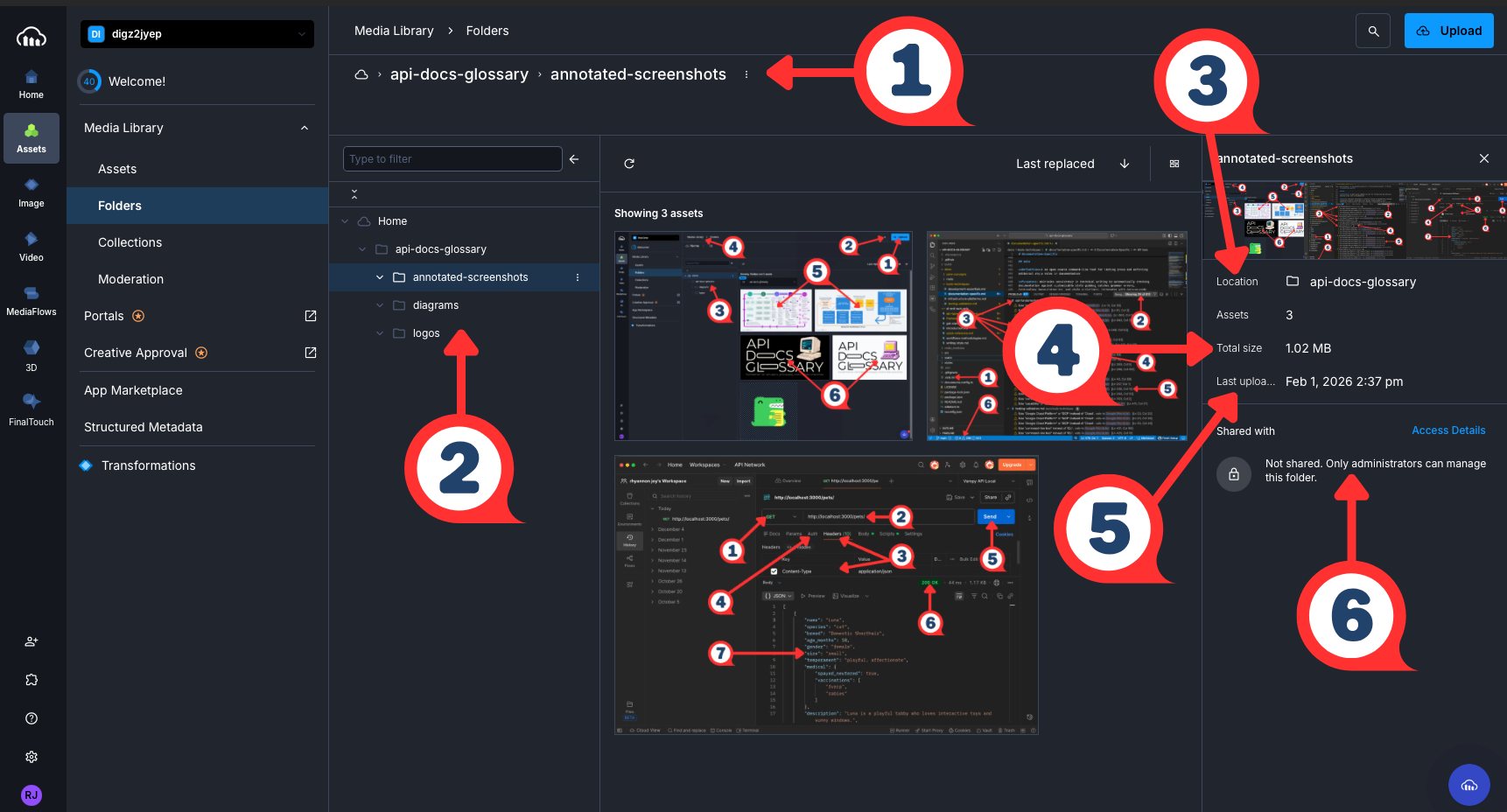
| # | UI Element | What It Demonstrates |
|---|---|---|
| 1 | Breadcrumb Path - api-docs-glossary > annotated-screenshots | Location Metadata - site of asset organization |
| 2 | Folder Tree | Structural Metadata - hierarchy that enables findability |
| 3 | Location | Organizational Metadata - asset’s place within the DAM |
| 4 | Total Size | System-Generated Metadata - automatically captured |
| 5 | Last Uploaded | Temporal Metadata - tracks date/time of content changes |
| 6 | Shared With | Permission Metadata - controls access |
Related Terms: CCMS, CMS, content, DAM, information architecture, knowledge graph, knowledge management, ontology, structured content, taxonomy, technical communication
Sources:
- Geeks for Geeks: "What is Metadata?"
- NISO: "Understanding Metadata: What is Metadata, and What is it For?: A Primer" by Jenn Riley
Mintlify
Definition: cloud-based documentation platform that generates and publishes interactive API reference sites from OpenAPI specifications and MDX files, with Git-based version control and AI-assisted writing features
Purpose: reduces the overhead of building and maintaining a polished API docs site by handling design, hosting, and OpenAPI rendering out of the box; enables tech writers and developers to publish interactive API references — including live API playgrounds, auto-generated code snippets, and built-in search — without managing custom infrastructure; supports a docs-as-code workflow through native GitHub integration, allowing docs changes to follow the same review and deployment process as code
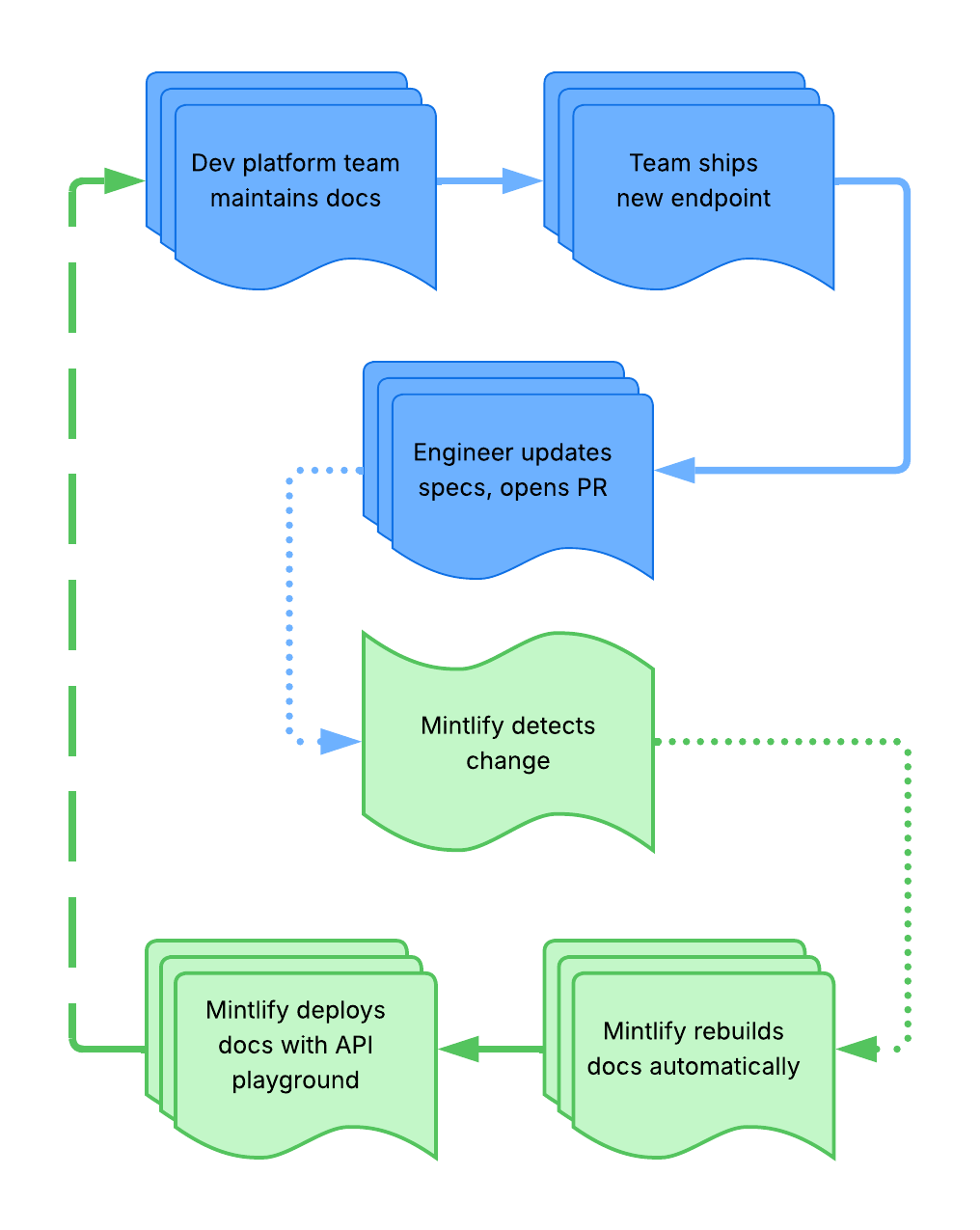
Example: Mintlify detection workflow -
Related Terms: AI-assisted documentation, API playground, developer portal, docs-as-code, Git, GitBook, MDX, OpenAPI Specification, Swagger, Tome, version control
Sources:
- Apidog, Inc.: "What is Mintlify Docs and How to Use It: A Beginner's Guide" by Ashley Goolam
- Mintlify, Inc., Mintlify Homepage: "The Intelligent Documentation Platform"
MkDocs
Definition: abbreviation of Markdown documentation; Python-based static site generator designed specifically for building project docs from Markdown files
Purpose: streamlines docs site creation with minimal configuration; widely adopted in API docs workflows for its clean default theme, automatic navigation generation, and built-in search; the Material for MkDocs theme features include enhanced UI, syntax highlighting, and content tabs commonly used for code examples in multiple languages
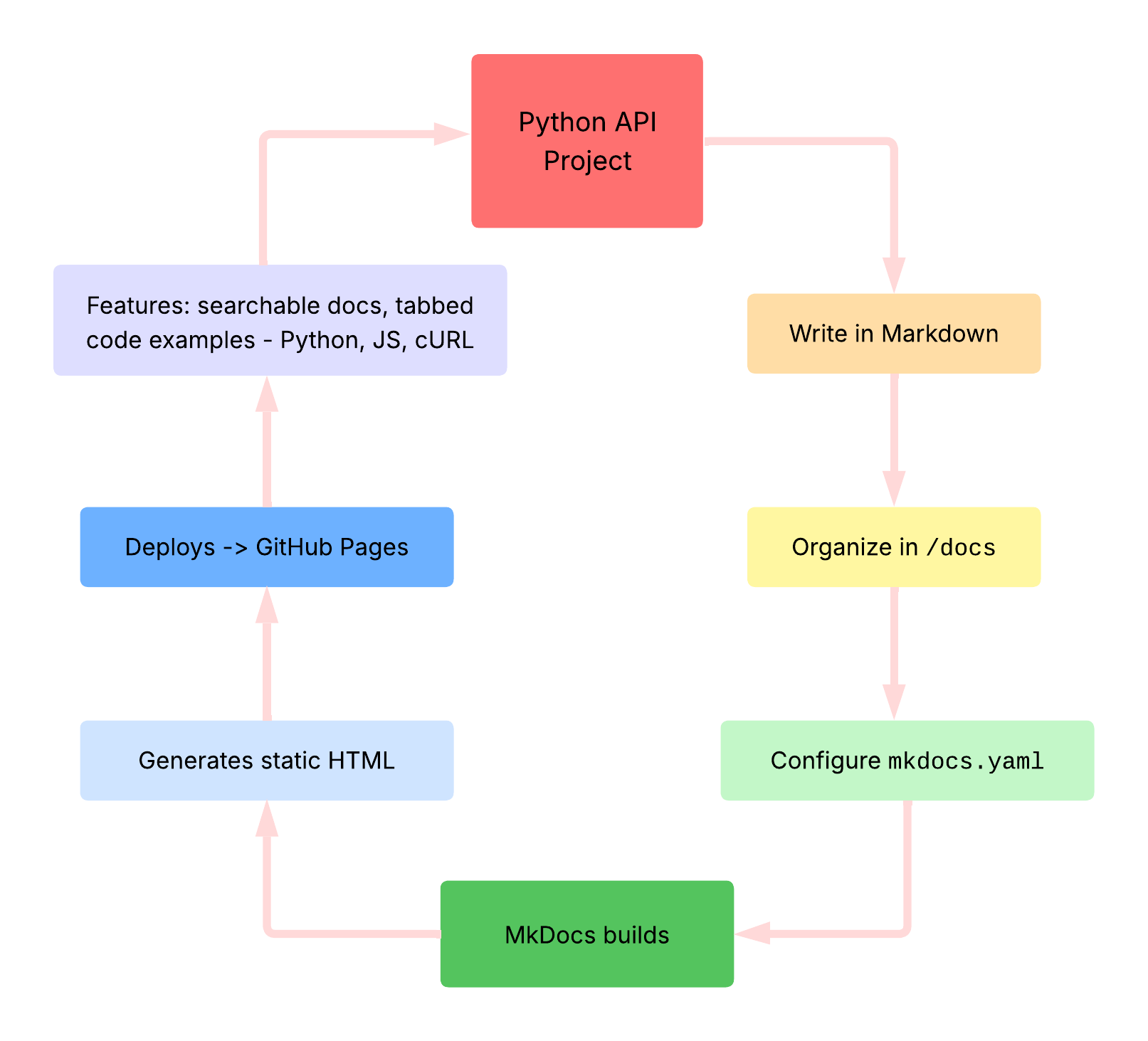
Example: Python API Project with MkDocs workflow -
Related Terms: Astro, docs-as-code, Docusaurus, Fumadocs, GitHub Pages, Markdown, rST, static site generator
Sources:
- Martin Donath: Material for MkDocs Documentation
- Tom Christie, MkDocs: "Getting Started with MkDocs"
- Wikipedia: "MkDocs"
Nextra
Definition: Next.js-based documentation framework that combines React, MDX, and static site generation to create interactive docs sites with minimal configuration
Purpose: streamlines API docs creation for teams already using Next.js or React by providing docs-specific features like automatic sidebar generation, full-text search, and syntax highlighting; integrates seamlessly with Next.js deployment workflows and supports dynamic content generation alongside static pages; commonly used for developer portals, API references, and technical docs requiring custom interactive components
Example: SaaS company documents their API using Nextra; the shared tech stack enables docs to stay synchronized with product releases and reuse existing components -
1. Engineering team already deploys their product on Vercel using Next.js
2. Tech writers create docs site with Nextra in the same monorepo
3. Writers use MDX to embed custom React components - API key generators, live request builders
4. Nextra generates static pages with automatic navigation and search
5. Deploys alongside the product with shared authentication and styling
Related Terms: docs-as-code, Docusaurus, Markdown, MDX, monorepo, static site generator
Source: Vercel, The Nextra Project: "Make beautiful websites with Next.js & MDX
partials
Definition: static site generator feature that inserts reusable
content fragments into multiple pages; feature name depends on the static
site generator - includes for Jekyll and snippets with MkDocs
Purpose: eliminates content duplication by maintaining a single source for shared content like API endpoint descriptions, code examples, or data model definitions; enables consistent documentation across multiple pages, versions, or white-labeled variants while reducing maintenance burden when shared content changes
Partials In Monorepos: these strategies address different problems
and often work together; content reuse, includes and/or snippets solve
the page-level problem of what gets shared within a documentation site,
while monorepos solve the repository-level problem of where multiple
documentation projects live; teams commonly combine both - using a monorepo
to house multiple documentation sites that each leverage includes for
shared content
Example: authentication flow reused across multiple pages in a monorepo;
the structure enables a single /shared folder and each product's
getting-started and API reference pages include auth-flow.md, so updating
the shared file propagates changes across all six pages -
api-docs-monorepo/
├── shared/
│   └── auth-flow.md              # Single source for all products
├── product-a/
│   ├── getting-started.md
│   └── api-reference.md
├── product-b/
│   ├── getting-started.md
│   └── api-reference.md
└── product-c/
    ├── getting-started.md
    └── api-reference.md
Implementation by Tool:
| Tool | Syntax |
|---|---|
| Jekyll | {% include auth-flow.md %} |
| MkDocs Material | --8<-- "auth-flow.md" |
| Docusaurus | import AuthFlow from './auth-flow.md'; then <AuthFlow /> |
Related Terms: CCMS, docs-as-code, Docusaurus, Markdown, MDX, MkDocs, monorepo, static site generator, white-labeling
Sources:
- Jekyll: "Includes"
- Meta Platforms, Inc., Docusaurus: "Importing code snippets"
- SmartSymbols, PyMdown Extensions Documentation: "Snippets"
- W3Tutorials: "Node.js Partial"
Postman
Definition: API development platform for designing, testing, documenting, and monitoring APIs through a graphical interface
Purpose: commonly used for REST API development, exploration, and testing workflows; provides a GUI alternative to cURL for making HTTP requests, supports automated test suites, collection sharing, and API documentation generation; power lies in its ability to chain requests, validate responses, and maintain test environments, validating both API behavior and documentation accuracy
Why this belongs in Documentation-Specific: Postman is primarily
a platform for exploring, documenting, and sharing APIs through
collections, automated documentation generation, and collaborative
workspaces; while it includes testing capabilities, its core identity
centers on API discovery and documentation workflows rather than
automated validation - teams use Postman to understand how APIs work
and communicate that understanding to others, making it
fundamentally a documentation and exploration tool
Postman Ecosystem:
- Fern - generates API docs and SDKs; acquired in January 2026
- Postman App - interactive interface for exploring and documenting APIs
- Postman Collections - organized groups of API requests with documentation
- Postman Newman - CLI collection runner executes tests for API requests, workflows
Example: a technical writer documents a pet adoption API using Postman collections -
- Organizes endpoints into folders: authentication,
/pets,/shelters - Documents each endpoint with descriptions, example requests, and expected responses
- Shares collection with developers and partners for interactive API exploration
- Maintains living documentation that stays synchronized as the API evolves
The screenshot below shows step two in action - documenting a single endpoint by examining its method, headers, and JSON response:
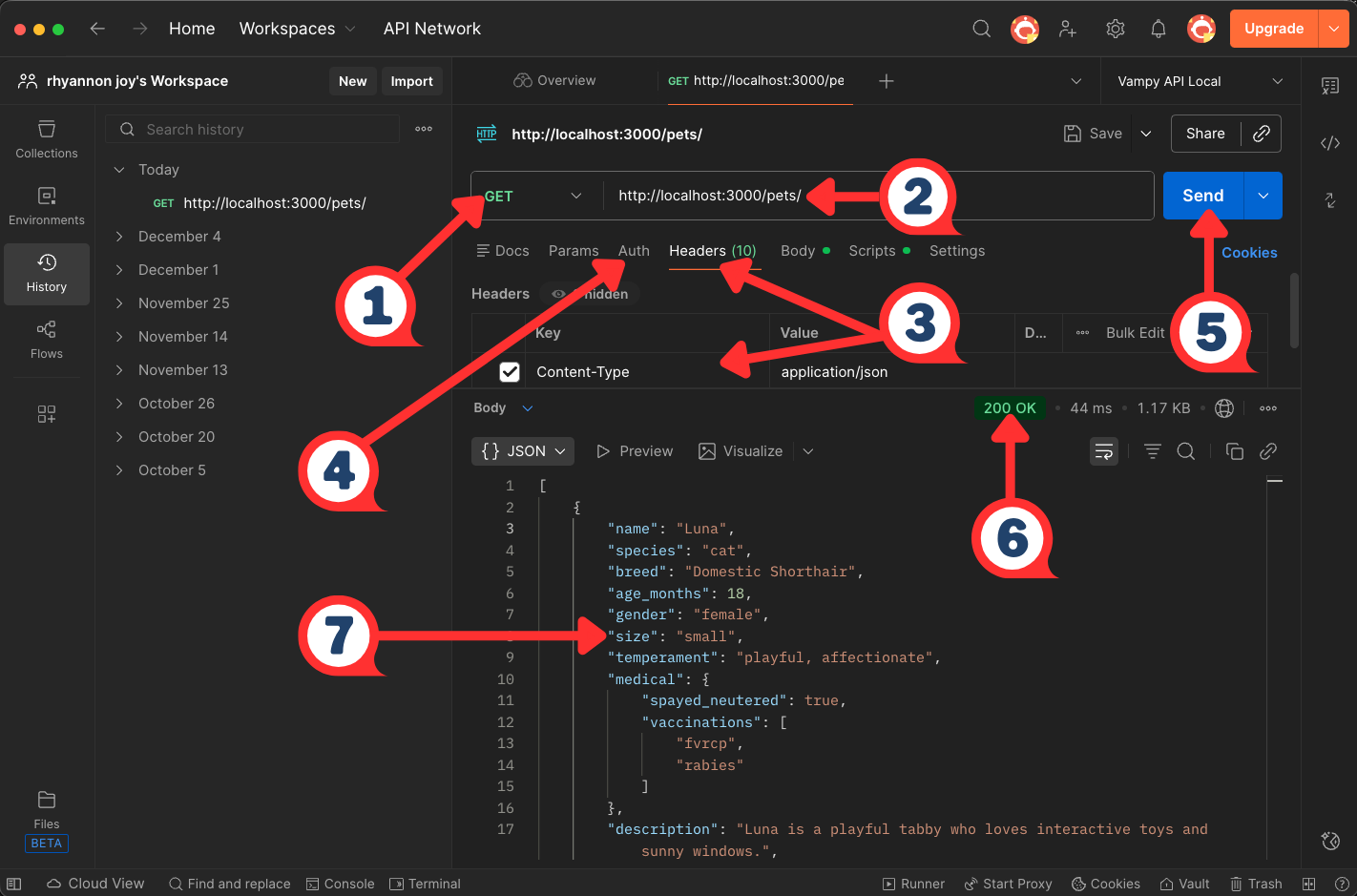
| # | Element | What It Demonstrates |
|---|---|---|
| 1 | Method Selector | HTTP method - defines the type of request |
| 2 | URL Bar | API endpoint - the address the request targets |
| 3 | Headers | request headers - metadata accompanying the request |
| 4 | Auth Tab | authentication - configure credentials here |
| 5 | Send Button | request trigger - initiates the request-response cycle |
| 6 | 200 OK | HTTP status code - indicates the request succeeded |
| 7 | Response Body | payload - JSON data returned by the API |
Related Terms:
Bruno, cURL, Fern,
GUI, json-server,
Postman Newman,
REST API, Stoplight,
Swagger, UI
Sources:
- Postman, Inc.: "What is Postman?"
- Silva, Manny. Docs As Tests. First edition, Release 2, Boffin Education, May 2025.
- UW API Docs: Module 3, Lesson 3, "Introduction to json-server, cURL, and Postman"
RFC
Definition: acronym for Request for Comments; numbered technical documents published by the IETF - Internet Engineering Task Force - that define standards, protocols, and procedures for internet technologies
Purpose: RFCs provide authoritative specifications for protocols like HTTP, HTTPS, and other web standards; API documentation writers reference RFCs to ensure accurate technical descriptions and link to them as sources for protocol definitions and behavior
Example: when documenting HTTP status codes, writers cite IETF RFC 9110 - HTTP Semantics as the authoritative source; RFC numbers, such as RFC 9110, provide a permanent, verifiable reference that remains accessible even as web pages change
Related Terms: HTTP, HTTPS, REST API
Sources:
Redocly
Definition: API documentation platform and OpenAPI tooling suite for creating, validating, and publishing API reference documentation
Purpose: transforms OpenAPI specifications into interactive, customizable documentation; provides linting and validation for API specifications through automated rule enforcement
Common Redocly Tools:
- Redocly CLI - command-line interface for linting, bundling, and building OpenAPI documents
- Redocly Respect - contract and workflow testing tool that continuously validates live APIs against Arazzo/OpenAPI definitions
- Redocly Developer Portal - hosts and renders interactive API documentation
Example: teams use Redocly CLI with Respect to lint OpenAPI files for style guide compliance in CI/CD pipelines, catching specification errors like missing descriptions or inconsistent naming conventions before deployment; once validated, documentation deploys to Redocly's hosting platform where developers can explore endpoints interactively
Related Terms: API documentation testing, CI/CD pipeline, CLI, docs-as-tests, OpenAPI Specification, Redocly Respect, Spectral, Stoplight, Swagger, Vale
Sources:
- Redocly Docs: "About Redocly Documentation"
- Redocly Docs: "Redocly Respect Use Cases"
- Silva, Manny. Docs As Tests. First edition, Release 2, Boffin Education, May 2025.
rST
Definition: acronym for reStructuredText; markup language designed for tech docs; default format for Python docs tooling
Purpose: provides semantic markup capabilities beyond Markdown, enabling complex docs structures with cross-references, directives, and extensibility; powers Python API docs through Sphinx and Read the Docs; supports tech writing needs like automatic API reference generation, table of contents, and index creation
reStructuredText vs Markdown
| Aspect | reStructuredText | Markdown |
|---|---|---|
| Complexity | More features, steeper learning curve | Straightforward syntax, faster onboarding |
| Extensibility | Directive system supports custom extensions | Limited extensibility without custom processors |
| Semantic Markup | Built-in support for admonitions, citations, cross-references | Requires extensions or HTML |
| Python Ecosystem | Standard for Python docs | Requires additional tooling |
| Cross-References | Native automatic linking between docs sections | Manual or plugin-dependent |
| Adoption | Dominant in Python projects | Dominant across many languages and platforms |
Example: a developer documents a Python REST API client library that enables consistent formatting between inline code docs and standalone guide pages -
1. Writes docstring in Python code using rST formatting
2. Creates `.rst` files for guides, tutorials, and architecture docs
3. Uses Sphinx to generate HTML docs automatically from docstring and `.rst` files
4. Deploys to Read the Docs for versioned, searchable API docs
Related Terms: docs-as-code, Markdown, MDX, MkDocs, static site generator
Sources:
- Docutils: "reStructuredText: Markup Syntax and Parser Component of Docutils"
- Sphinx Documentation: "reStructuredText Primer"
- Write the Docs: "Introduction to reStructuredText"
Spectral
Definition: open source JSON/YAML linter for creating automated style guides and validating API descriptions against customizable rulesets
Purpose: enforces API design standards and best practices by checking OpenAPI, AsyncAPI, and JSON Schema documents for structure, completeness, and style compliance; catches specification errors before API implementation; ensures consistent API design patterns across teams through automated validation of OpenAPI/AsyncAPI documents
Example: a documentation team configures Spectral to enforce their API style guide, requiring all endpoints to have descriptions, examples, and proper HTTP status code documentation; when a developer submits a pull request with an OpenAPI spec missing operation descriptions, Spectral flags the violations in CI/CD, preventing merge until documentation is complete
Related Terms: API documentation testing, AsyncAPI, contract testing, JSON, OpenAPI Specification, Redocly
Sources:
- SmartBear Software, Stoplight: "Spectral: An open source API style guide enforcer and linter"
- GitHub: stoplightio/spectral
static site generator
Definition: also known as an SSG; build tool that transforms plain text content and templates into HTML files without requiring a database or server-side processing; popular SSGs include Docusaurus, Gatsby, Hugo, and Jekyll
Purpose: enables fast, secure, and scalable documentation sites by pre-building all pages during deployment rather than generating them on each request; commonly used in API docs for version control integration, Markdown support, and streamlining deployment
Example 1: a docs team uses an SSG to build their API reference from Markdown files; the CI/CD pipeline runs the generator to rebuild the site, then deploys it to a CDN, content delivery network, for loading -
Example 2: API Docs Glossary's Markdown and rendered docs side-by-side:
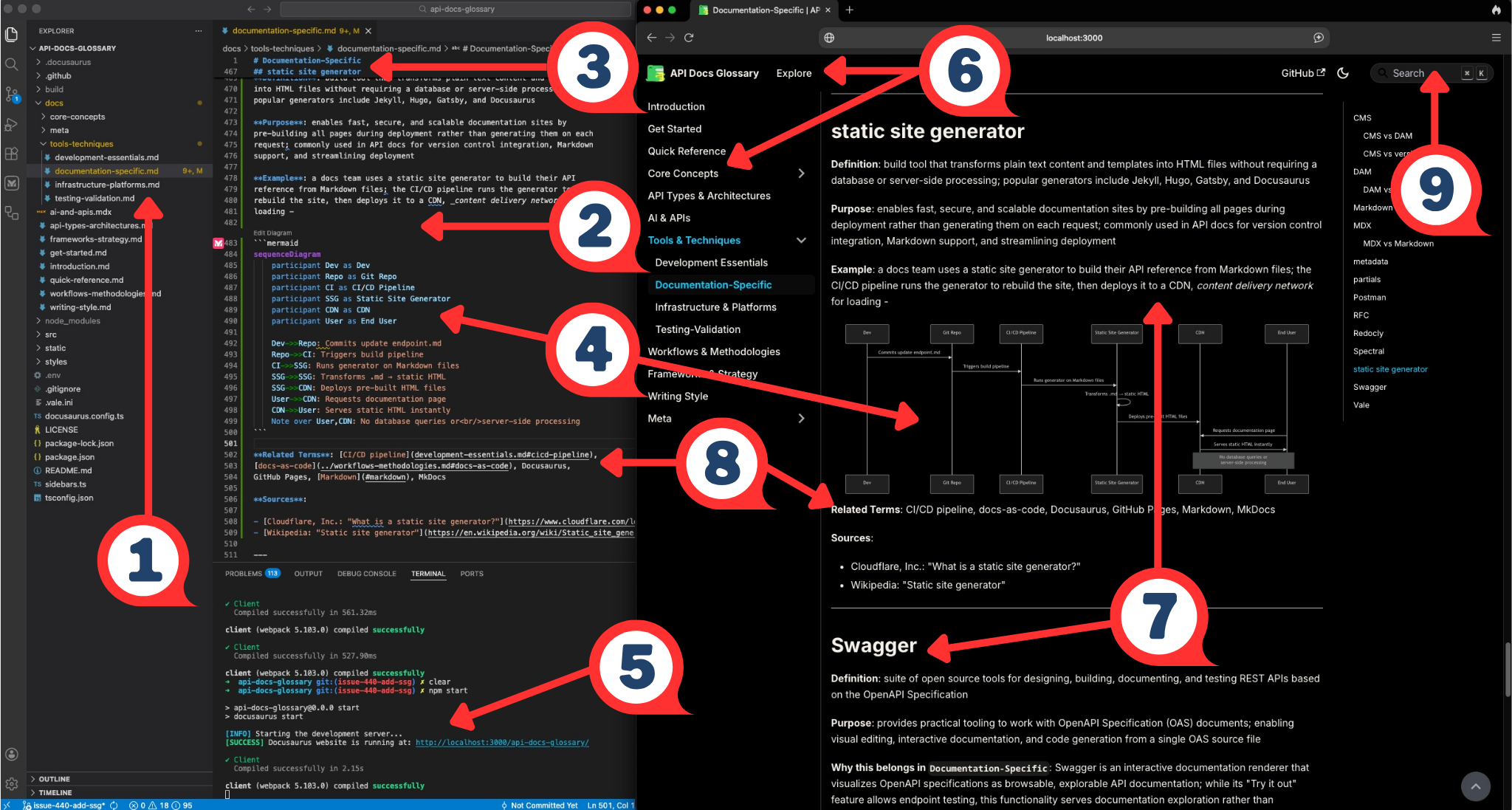
| # | Element | What It Demonstrates |
|---|---|---|
| 1 | Repo Project Tree | Docs live in a version‑controlled code repo, following a docs‑as‑code workflow |
| 2 | Markdown Glossary Category File | SSG reads Markdown files as the source for each docs page |
| 3 | Markdown Headings and Body | Writers focus on content using lightweight syntax instead of HTML |
| 4 | Mermaid Diagram | SSG renders diagrams in Mermaid code as site images |
| 5 | Dev Server, Build Output | A local command compiles Markdown into a static site, serves a preview |
| 6 | Site Header and Nav | SSG assembles a full documentation UI from the config |
| 7 | Rendered Page Content | Markdown on the left appears here as HTML in the final static docs site |
| 8 | Related Terms Links | Structured metadata generates cross‑links between glossary entries |
| 9 | Search Bar | SSG features like search enhance the generated docs site |
Related Terms: Astro, CI/CD pipeline, docs-as-code, Docusaurus, Fumadocs, GitHub Pages, Markdown, MkDocs, Nextra, rST, Tome
Sources:
Stoplight
Definition: API design and documentation platform that provides visual editors, automated docs generation, and mock servers for API development workflows
Purpose: enables API-first development by allowing teams to design APIs visually, generate OpenAPI specifications, create interactive docs, and validate implementations against specs; commonly used in API docs workflows for collaborative design reviews, automated doc generation from OpenAPI files, and maintaining consistency between API design and documentation
Example: Stoplight Studio design-development workflow -

Related Terms: docs-as-code, OpenAPI Specification, Postman, Redocly, Swagger
Sources:
- Apidog, Inc.: "Tutorial: What is Stoplight Studio and How to use it (2026 Guide)"
- SmartBear Software, Stoplight: "Design, document, and build APIs faster"
Swagger
Definition: suite of open source tools for designing, building, documenting, and testing REST APIs based on the OpenAPI Specification
Purpose: provides practical tooling to work with OpenAPI Specification (OAS) documents; enabling visual editing, interactive documentation, and code generation from a single OAS source file
Why this belongs in Documentation-Specific: Swagger is an
interactive documentation renderer that visualizes OpenAPI specifications
as browsable, explorable API documentation; while its "Try it out" feature
allows endpoint testing, this functionality serves documentation exploration
rather than automated validation - the tool's primary purpose is presenting
API specifications to developers in human-readable, interactive format,
making it a documentation presentation tool rather than a testing framework
Common Swagger Tools:
- Swagger UI - generates interactive API documentation from OAS files
- Swagger Editor - web-based editor for creating and editing OAS documents
- Swagger Codegen - generates client libraries and server stubs from OAS files
Example: API development workflow with Swagger -

Related terms: API playground, GUI, Mintlify, OpenAPI Specification, Redocly, REST API, Stoplight
Sources:
- Kovai.co, Document360: "Swagger API: How They Work & What You Need to Know" by Shakeer Hussain
- SmartBear Software: "What is Swagger"
Tome
Definition: open source docs platform that generates docs sites from Markdown and MDX files with built-in full-text search, API reference support, and AI chat; available as a self-hosted deployment or through Tome Cloud
Purpose: provides a Mintlify-alternative docs publishing workflow at no licensing cost for teams that want managed-platform aesthetics without the SaaS pricing; self-hosted deployment gives teams full control over infrastructure and data; Tome Cloud offers a hosted path for teams that want managed deployment without building custom infrastructure
Maturity: Tome is an early-stage project; the GitHub repository has limited adoption signals compared to Mintlify, GitBook, Docusaurus, and MkDocs as of early 2026; evaluate project activity before adopting for production use
Example: a startup with privacy requirements self-hosts Tome on their own infrastructure to publish an API reference and developer portal, avoiding SaaS licensing costs and keeping docs traffic off third-party servers; teams with fewer infrastructure constraints deploy to Tome Cloud using the same Markdown and MDX source files
Related Terms: developer portal, docs-as-code, Markdown, MDX, Mintlify, OpenAPI Specification, static site generator
Sources:
Vale
Definition: an open source command-line tool for linting prose and enforcing editorial style rules in documentation
Purpose: maintains consistency in technical writing by automatically checking documentation against customizable style guides; catches grammar errors, terminology inconsistencies, and style violations; integrates with docs-as-code workflows and CI/CD pipelines to enforce writing standards before publishing; supports multiple style guides including Microsoft, Google, and custom rules
Example: The screenshot below shows Vale running in VS Code against the
glossary - each warning maps to a specific style rule enforced across the project.
Vale flags style violations across all docs files simultaneously;
the screenshot filters
Google.WordList
warnings from 817 total rules - the same type of triage that informed the Vale
configuration decisions documented in the
Style Guide:
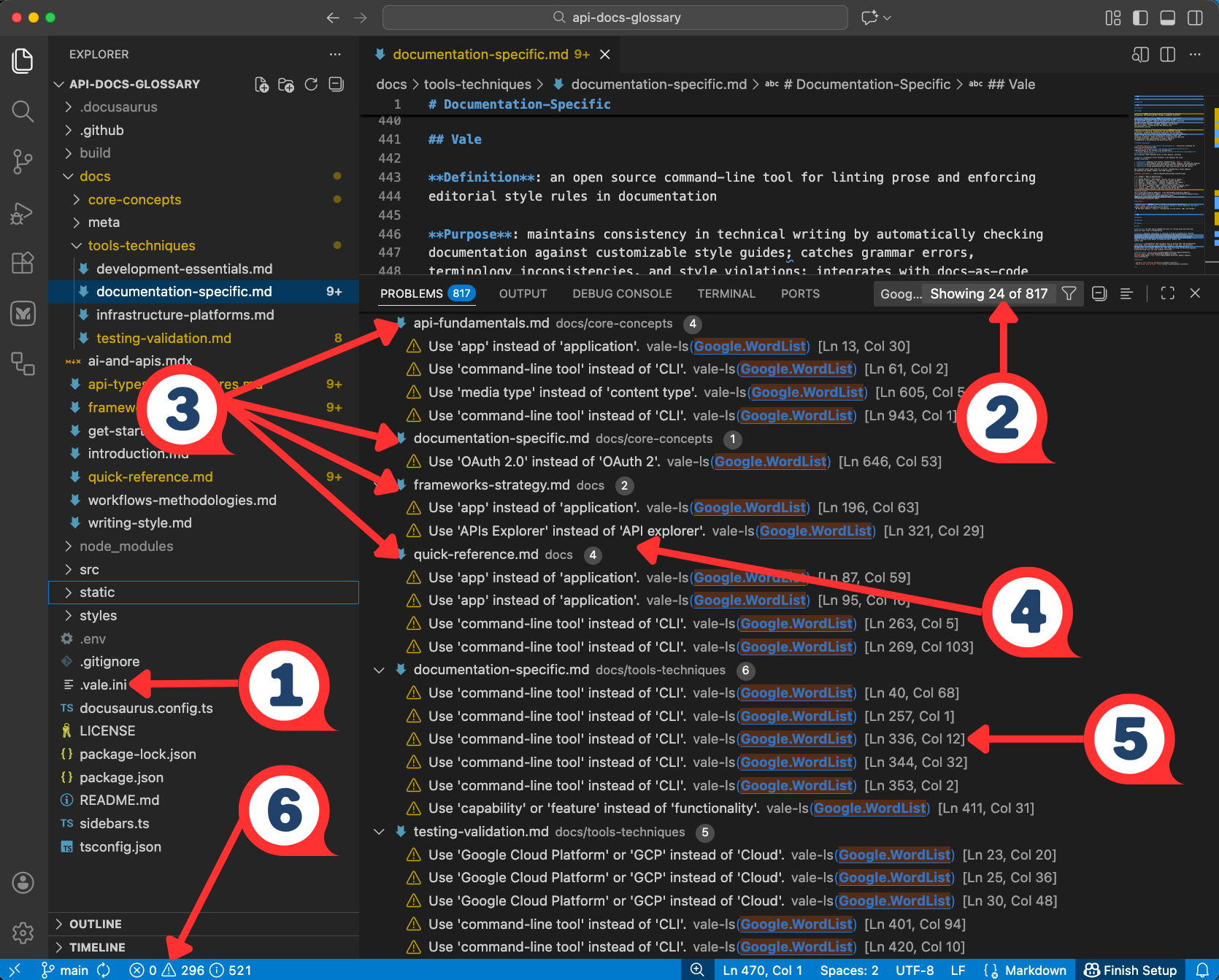
| # | UI Element | What It Demonstrates |
|---|---|---|
| 1 | .vale.ini in the file tree | Configuration file where teams define and manage style rules |
| 2 | Filter showing Google...Showing 24 of 817 | Rule filtering - Vale enforces hundreds of rules, but teams focus on specific ones |
| 3 | File Grouping - api-fundamentals.mdx, documentation-specific.md | Project-wide enforcement - Vale lints all docs files simultaneously |
| 4 | WordList Suggestions - "Use 'APIs Explorer' instead of 'API explorer'" | Terminology consistency - enforcing preferred vocabulary across the project |
| 5 | Line and Column Reference - [Ln 336, Col 12] | Precise location - pinpoints exactly where each violation occurs |
| 6 | ⚠ Warning Count vs ⛒ 0 Errors in Status Bar | Severity levels - warnings flag style preferences without blocking the workflow |
Related Terms: CI/CD pipeline, docs-as-code, Markdown, pull request, Redocly
Sources: