Style Guide
This guide defines content standards for the API Docs Glossary: what makes a good term entry, how to format definitions, capitalization rules, and writing conventions. All contributions must follow these standards to maintain consistency and quality.
For technical setup and the pull request process, visit the Contribution Guide.
Glossary Philosophy
The API Docs Glossary exists to demystify API documentation terminology for writers, developers, and technical communicators. Good glossary entries:
- Aim for clarity over comprehensiveness - brief, scannable definitions that get readers oriented quickly
- Connect concepts - show how terms relate to each other through thoughtful linking
- Focus on API documentation context - explain why terms matter specifically for documenting APIs
- Serve real needs - address terms readers actually encounter in API documentation work
- Make decision-making visible - document the "why" behind structural choices, demonstrating that good technical writing includes explaining the reasoning, not just presenting information
This glossary isn't an exhaustive technical reference. It's a practical resource for people learning or working in API documentation who need quick, reliable definitions. The Style Guide itself models this philosophy: when making non-obvious choices about structure, formatting, or categorization, document the reasoning explicitly.
Contribution Content Strategy
Documentation improvements are always welcome. Contributions must benefit API Docs Glossary readers. Contributions are especially welcome if they:
- add new API documentation terms with clear definitions
- improve clarity of existing definitions
- add relevant examples to existing terms
- fix technical inaccuracies
Before contributing, create an issue to discuss additions or changes.
Add a new glossary term
Most terms live in existing category files. To add a new term:
-
Identify which category file the term belongs in:
quick-reference.md- common terms, concise definitions/core-concepts- fundamental API documentation conceptsapi-types-architectures.mdx- different architectural patterns and protocolsai-and-apis.mdx- AI technologies, concepts relevant to API documentation/tools-techniques- tools, software, methodsworkflows-methodologies.mdx- development, documentation workflows for API projectsframeworks-strategy.mdx- conceptual models, strategic approaches for API documentation workwriting-style.mdx- language conventions, tone guidelines, rhetorical approaches
-
Add the term using this format:
## term name

**Definition**: [brief, clear definition]

**Purpose**: [why this matters for API documentation]

**Example**: [real-world example or use case]

**Related Terms**: [links to related glossary terms]

**Source**: [acknowledgement of the information's origin] -
Place the term alphabetically within its section or at the end of the appropriate subsection
-
Test locally with
npm run buildandnpm startto ensure links work and formatting looks correct
Category Placement
Choosing the correct category for a glossary term ensures readers can find information intuitively and understand how concepts relate to each other. Most terms have an obvious category home, but some terms span multiple domains or represent emerging practices that don't fit neatly into existing categories.
Selection Guidelines
When determining where a glossary term belongs, consider:
- Primary Function: What does this glossary term fundamentally describe?
- User Context: When would readers need this term?
- Distinguishing Characteristics: Concept type and/or tool?
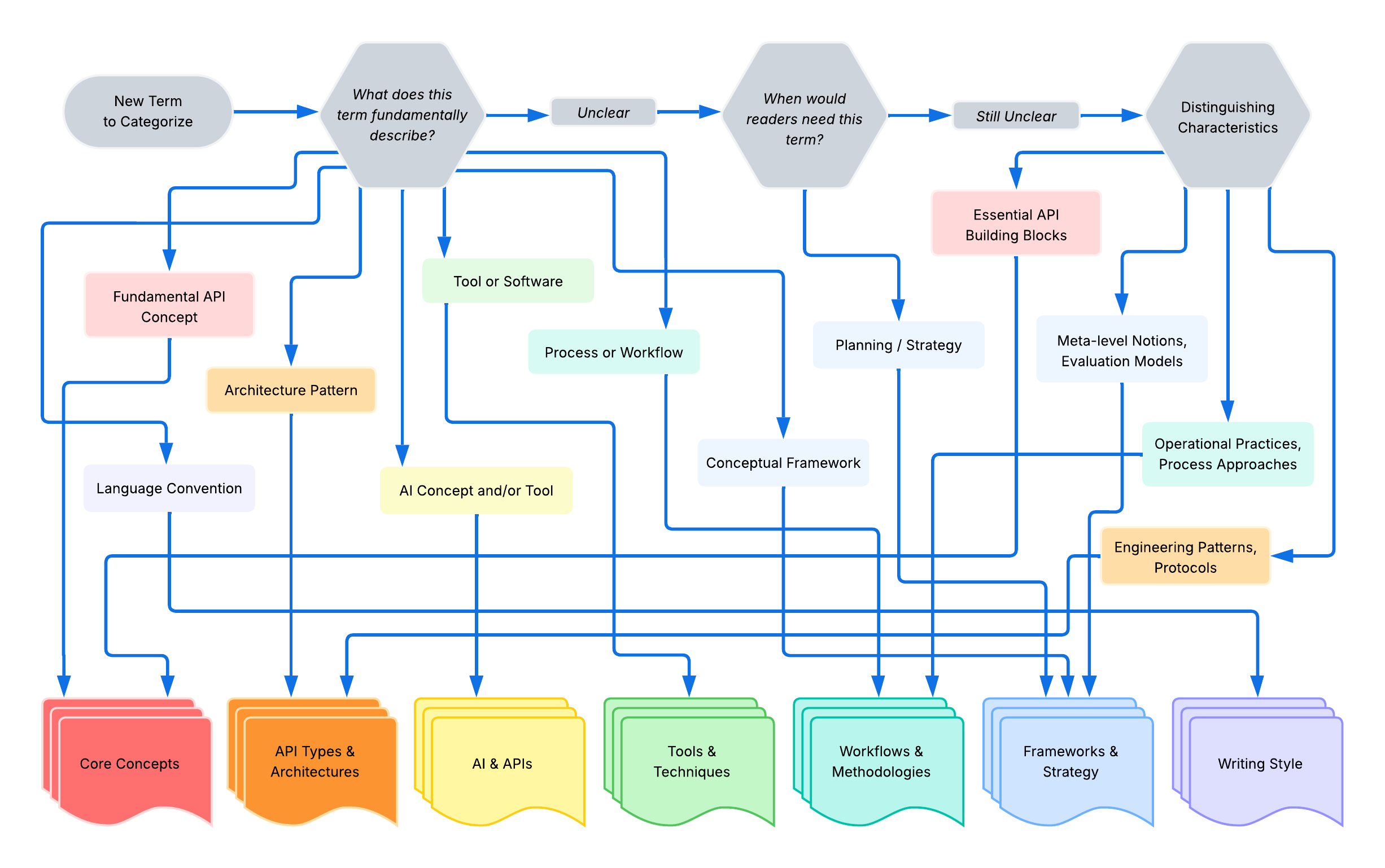
When to Document
Most glossary terms don't need explicit category justification. Consider the following when determining whether category reasoning serves the Glossary Philosophy or not:
| Scenario | Document? | Example | Why |
|---|---|---|---|
| Term could reasonably fit multiple categories | ✅ Yes | docs-as-tests involves both tools and workflow methodology | Clarifies the primary classification and prevents confusion |
| Term represents emerging practice without clear precedent | ✅ Yes | docs-as-tests is relatively new | Explaining the decision helps readers and future contributors understand the pattern |
| Category choice questioned or challenged | ✅ Yes | API testing could be a technique or part of a broader workflow | Anticipating confusion and addressing it proactively helps readers understand the term's scope |
| Decision establishes a pattern for similar future terms | ✅ Yes | Explaining why docs-as-tests goes in Workflows & Methodologies | Creates a reference point for similar methodology terms |
| Understanding the category helps readers grasp the term's nature | ✅ Yes | Category placement itself is educational context | Enriches understanding of what the term fundamentally is |
| Term has obvious category fit | ❌ No | Git clearly belongs in Tools & Techniques | Adding reasoning would be redundant and clutter the entry |
| Category is self-evident from the definition | ❌ No | API obviously belongs in Core Concepts | Readers don't need explanation for clear categorization |
Reasoning Format: add category placement reasoning as a visible field
in the term entry using the "Why this belongs in [Category]" format,
this makes the reasoning transparent to readers and helps them understand
the scope and nature of the term
Why category reasoning gets its own field:
Separating category reasoning into its own field demonstrates a core technical writing principle - make decision-making processes explicit and structured. This Style Guide emphasizes concise, scannable definitions using sentence fragments and phrases. Category placement reasoning needs its own dedicated field to -
- Preserve Clarity in
DefinitionandPurposeFields - these fields should remain focused on what the term means and why it matters, not why it's categorized a certain way - Avoid Overloading
ExampleFields - examples should illustrate usage, not justify categorization - Maintain Scannability - readers can quickly find core information without wading through meta-commentary about category decisions
- Be Explicit and Structured - category reasoning is meta-information that deserves clear separation from the term's actual definition and purpose
Format Examples:
## term name

**Definition**: [brief, clear definition]

**Purpose**: [why this matters for API documentation]

**Why this belongs in `[Category Name]`**: [explain why this category is the best fit,
focusing on the term's primary function and distinguishing characteristics]

**Example**: [real-world example or use case]

**Related Terms**: [links to related glossary terms]

**Source**: [acknowledgement of the information's origin]

---

## docs-as-tests

**Definition**: documentation strategy that treats documentation as testable assertions
to verify content accuracy against the current product state

**Purpose**: maintains documentation accuracy through automated testing that validates
docs work as written by directly testing against product UIs, APIs, and CLIs

**Why this belongs in `Workflows & Methodologies`**: describes an operational workflow
approach that focuses on processes and practices rather than specific tools or conceptual
frameworks; represents a documentation methodology similar to Agile or docs-as-code,
emphasizing the practice of continuous validation rather than the tools that implement it
...

---

<!--distinction from another category-->
## API documentation testing

**Definition**: the practice of validating that APIs function correctly, return expected
responses, handle errors appropriately, and meet performance requirements

**Purpose**: ensures API reliability and accuracy before production deployment; in
API documentation contexts, validates that documented endpoints, parameters, and code
examples work as written

**Why this belongs in `Workflows & Methodologies`**: describes a testing practice and
validation workflow that focuses on how teams verify APIs as part of documentation
maintenance and emphasizes the practice of testing rather than a specific tool;
`Core Concepts` covers what APIs are fundamentally, while API testing is about what
teams do with APIs - a workflow practice, not a fundamental API characteristic
...
Reasoning Best Practices:
- Don't Over-Document: most terms don't need placement reasoning - only include it when it adds value for readers
- Be Concise: keep reasoning focused and clear; explain the primary reason first
- Show Distinctions: when relevant, briefly explain why the term doesn't fit in another obvious category
- Think Forward: consider how the decision guides future similar terms
- Test the Placement: if articulating why a term belongs in its category is too difficult, reconsider the placement
- Ask for Feedback: when uncertain, create an issue to discuss with other contributors before committing to a category
Abbreviations
TL;DR - just pick a pattern and roll with it;
consistency matters more than the choice itself
When deciding when and where to use abbreviations, consider the following example:
Documentation vs Docs
Both "docs" and "documentation" are grammatically correct; choose based on context and maintain consistency -
Use "Docs":
- while using established compound terms - docs-as-code, docs-as-tests
- for project names and approachability - API Docs Glossary, Read the Docs
- when brevity improves scannability in navigation or headings
Use "Documentation":
- in formal glossary term definitions
- when professional tone is important
- in official contexts or specifications
| Context | Form | Examples | Why |
|---|---|---|---|
| Project/Product Names | "docs" or "doc" | ADG, Write the Docs, Doc Detective | Branding choice - both are valid as a naming decision, not a grammar rule |
| Compound Terms | "docs" or "documentation" | docs-as-code, API documentation testing | Either works - consistency matters more |
| Formal Writing | "documentation" | API documentation, technical documentation | More professional tone |
| Conversational | "docs" | "I updated the docs" or "check the docs" | Natural, common usage |
Acronyms
Acronym use is most impactful in headings because headings serve as both navigation labels and anchor links in Docusaurus. Consider the relationship of the glossary term's official name and how someone is most likely to reference it in conversation. Use the most recognizable form of a term in headings to create clean, scannable navigation and maintainable anchor links.
Use the acronym alone when it's widely recognized and commonly used:
- ✅
## APInot## API (Application Programming Interface) - ✅
## HTTPnot## HTTP (Hypertext Transfer Protocol) - ✅
## JSONnot## JSON (JavaScript Object Notation) - ✅
## REST APInot## REST (Representational State Transfer) API
Rationale: acronyms in headings create shorter, cleaner navigation panels
and anchor links; [HTTP](#http) is easier to write and maintain than
[HTTP](#http-hypertext-transfer-protocol)
Explain the full name in the definition field immediately after the heading:
## REST API

**Definition**: acronym for *RE*presentational State Transfer
application programming interface...
## gRPC API

**Definition**: uses gRPC - *Google's Remote Procedure Call* - framework...
<!-- definition structure in Quick Reference-->

### UI

- acronym for _user interface_
- space where interactions between humans and machines occur

**Glossary Term Entry Location**: [Tools & Techniques, Development Essentials, Interfaces & Formats - UI](../tools-techniques/development-essentials.mdx#ui)
Use the full name when the acronym isn't widely recognized or when the full name is more commonly used:
- ✅
## Critical Chain Project Managementnot## CCPM - ✅
## Waterfallnot## Waterfall Project Management Methodology - ✅
## guerilla usability testingnot## GUT
When unsure, check common usage patterns:
- search API documentation, technical articles, and MDN Web Docs
- if the acronym appears more frequently than the full name, use the acronym
- if the full name is more recognizable, use the full name
- consider the glossary target audience - what term would they search for?
Never use parenthetical expansions in headings - they clutter navigation and create unnecessarily long anchor links:
- ❌
## SOAP (Simple Object Access Protocol) API - ✅
## SOAP APIwith definition explaining Simple Object Access Protocol - ❌
## URI (Uniform Resource Identifier) - ✅
## URIwith definition explaining Uniform Resource Identifier
Anchor Link Consistency
Headings become anchor links automatically; keep them concise to:
- streamline cross-referencing between terms
- reduce errors when creating links
- improve navigation panel readability
| Heading Style | Anchor Link | Usability |
|---|---|---|
## HTTP | [HTTP](#http) | ✅ Short, clear, maintainable |
## HTTP (Hypertext Transfer Protocol) | [HTTP](#http-hypertext-transfer-protocol) | ❌ Long, error-prone |
## URL | [URL](#url) | ✅ Short, clear, maintainable |
## URL (Uniform Resource Locator) | [URL](#uniform-resource-locator-url) | ❌ Long, error-prone |
Updating Links
When renaming terms or reorganizing the glossary, don't forget to update all anchor links that reference the changed term. Use grep to find all instances in Markdown files:
Find all links to a specific anchor:
grep -rn "](#anchor-name)" . --include="*.md"
Example - find links to #openapi-specification-oas:
grep -rn "](#openapi-specification-oas)" . --include="*.md"
Break down the command:
grep- search tool-r- recursive, searches all subdirectories-n- shows line numbers in results"](#anchor-name)"- the pattern to find, Markdown link syntax.- current directory--include="*.md"- only search Markdown files, exclude config files
After finding all instances:
- Review each result to determine if it needs updating
- Some links may need just the anchor changed:
#new-anchor - Others may need the specific file in the path changed:
glossary.md#anchor - Update each link manually based on context
Troubleshooting Broken Links
After updating headings, run npm run build to verify that all anchor
links are working. Docusaurus reports any broken anchors it finds.
Example build output with broken anchors:
[WARNING] Docusaurus found broken anchors!
- Broken anchor on source page path = /docs/tools-techniques:
   -> linking to #pull-request-pr
Find and fix broken anchors:
-
Run the build command to identify broken links:
npm run build -
Use grep to find all instances of the old anchor format. Common patterns when removing acronyms from headings:
# Find links with acronym suffixes that need updating
grep -rn "#guerrilla-usability-testing-gut" . --include="*.md"
grep -rn "#pull-request-pr" . --include="*.md"
grep -rn "#openapi-specification-oas" . --include="*.md"

# Find cross-file links that may have changed
grep -rn "core-concepts#rest" . --include="*.md" -
Update each link manually to match the new heading format
-
Run
npm run buildagain to verify the corrections
Common Causes of Broken Anchors:
- updated a heading but forgot to update the Related Terms links
- removed acronyms from headings but left them in anchor links
- changed file organization but didn't update cross-file references
- typos in manually created anchor links
Capitalization
Use consistent capitalization to maintain clarity and professionalism.
Term Rules by Category
| Category | Rule | Examples |
|---|---|---|
| Proper noun & products | Always capitalize official names | Agile, Git, GitHub |
| Official tools | Capitalize specific product names | GitHub Desktop, Swagger Editor |
| Acronyms | Always capitalize | API, GUI, HTTP/HTTPS, REST |
| Brand-specific | Follow the product's capitalization | cURL, json-server, macOS |
| Common terms | Use lowercase | branch, commit, repository |
| Git commands | Use lowercase | pull, push, rebase |
| Generic phrases | Use lowercase | merge conflict, pull request, version control |
| File types | Use lowercase unless referring to the language | markdown file, but Markdown language |
Headings: match term headings with the capitalization of the term itself -
## branchnot## Branch## GitHubnot## github##REST APInot##REST api
Category and section headings use different capitalization based on their function -
- Labels and Titles use title case:
# Core Concepts,# Tools & Techniques,## Glossary Philosophy - Task-Based or Action Phrases use sentence case:
## Add a new glossary term,## Create a new category
Rationale: term headings follow the natural capitalization of the term definition - lowercase for common terms, proper capitalization for brands and/or acronyms; category headings use title case because they function as navigation labels and section titles rather than as terms themselves
Note: this glossary disables Google.Headings in
.vale.ini,
which prefers sentence-case headings. Matching term capitalization and using
title case for categories improves clarity and usability for this project.
Disable any Vale or Google rules that conflict with the project's goals -
style guides should serve the documentation, not constrain it.
Field Content: use sentence fragments and/or phrases rather than complete sentences; start with lowercase unless the word is a proper noun -
## branch

**Definition**: a parallel version of a repository that enables work on changes without affecting the main codebase

**Purpose**: enables multiple developers to work on different features simultaneously in API documentation workflows
Rare Exception: if a definition must be a complete sentence for clarity, capitalize the first word per standard sentence rules, even if it's the term itself -
## rebase

**Definition**: Rebase updates the base commit from which a branch was created.
Related Terms Linking Strategy
Link related terms to help readers navigate connected concepts and build understanding of how terms relate to each other. Include at least 3 related terms per entry. Too few misses valuable connections, while too many overwhelms and dilutes relevance. Link terms that are -
- Directly Connected: terms used together in workflows, such as branch → merge → commit → rebase
- Prerequisite Concepts: terms readers need to understand first, such as REST API → HTTP → JSON
- Higher-Level Concepts: category terms that provide context, such as CLI → cURL → API documentation testing
Related Terms Format and Syntax:
- list terms in alphabetical order
- use the exact term name as it appears in its heading
- separate with commas:
**Related Terms**: branch, commit, merge, rebase
Terms in the Same File:
**Related Terms**: [term name](#term-name)

**Related Terms**: [API](#api), [REST API](#rest-api)
Terms in Different Files:
**Related Terms**: [term name](filename.md#term-name)

**Related Terms**: [Git](tools-techniques/development-essentials.mdx#git), [GitHub](tools-techniques/development-essentials.mdx#github)
Best Practices:
- the anchor link -
#term-name- must exactly match the heading - use lowercase and hyphens for multi-word terms:
#http-status-codes - acronyms are lowercase in anchors:
#rest-apinot#REST-API - test all links locally with
npm run buildandnpm startbefore submitting - only link to terms that exist - don't add terms in the Related Terms list that don't have glossary entries
Source Reference
Provide specific, verifiable sources for all term definitions and information. Sources acknowledge where information originates and allow readers to explore topics further.
Source Format
For web sources, use descriptive link text with the full URL:
**Source**: [Organization Name: "Page Title"](https://full-url.com)
Example:
**Source**: [IETF RFC 9110 - HTTP Semantics](https://www.rfc-editor.org/rfc/rfc9110.html)
For course materials, include course name, module, lesson, and topic title:
**Source**: Course Name: Module X, Lesson Y, "Topic Title"
Example:
**Source**: UW API Docs: Module 5, Lesson 1, "REST API Fundamentals"
For many sources, use a bulleted list:
**Sources**:

- [Organization: "Title"](https://url.com)
- Course Name: Module X, Lesson Y, "Topic"
Example:
**Sources**:

- [University of Washington: "AI + Teaching"](https://teaching.washington.edu/course-design/ai/)
- UW API Docs: Module 1, Lesson 4, "Intro to AI and API docs"
Source Best Practices
- be as specific as possible - include authors' names, exact page titles, section names, or RFC numbers
- for official specifications - HTTP, OpenAPI - link to the authoritative source
- for course materials without public URLs, provide enough detail for verification
- if citing forum discussions or informal sources, note the context: "UW API Docs Canvas Forum"
- when a term draws from many sources, sort them alphabetically
Expanding Glossary Term Entries
While the basic term structure - Definition, Purpose, Example,
Related Terms, Sources - provides a solid foundation, some terms benefit
from additional context, clarification, or community insights. The glossary
should grow organically to address real confusion, document important
distinctions, and capture valuable perspectives from the API documentation
community.
The goal is a living glossary that grows thoughtfully in response to real needs while maintaining its core mission: demystifying API documentation terminology with clarity and practical focus.
When to Create Comparison Entries
Some terms benefit from direct comparison rather than separate entries. Consider creating a dedicated comparison entry when:
| Scenario | Example | Action |
|---|---|---|
| Terms are frequently confused or used interchangeably | REST vs RESTful - often treated as synonyms despite technical distinction | Create a comparison entry that explains both the technical distinction and practical usage |
| The relationship between terms is more important than individual definitions | Understanding that REST is the architectural style while RESTful describes implementations | Focus the entry on the relationship and when each term applies |
| Explaining the difference helps writers make better terminology choices | Knowing both terms are acceptable in API docs reduces terminology anxiety | Document that consistency matters more than picking the "right" term |
| Common usage differs from technical precision | Practitioners use REST and RESTful interchangeably in documentation | Acknowledge both the technical distinction and real-world practice |
Format for comparison entries: use Term A vs Term B as the
entry name/header, then structure as:
- Definition - explain both terms and their relationship
- Purpose - focus on why understanding the distinction, or lack thereof, matters for API documentation
- Example - show both terms in practical use
- Related Terms - link to the underlying concepts both terms reference
- Sources - cite relevant discussions or information origin
When to Expand Entries
| Scenario | Example | Action |
|---|---|---|
| The term is frequently misunderstood or misapplied | API testing in documentation contexts vs. QA testing | Add clarification fields to address common confusion points |
| Important distinctions exist that readers need to understand | How docs-as-tests differs from traditional QA workflows | Add dedicated comparison or distinction fields |
| Category placement is non-obvious or could be questioned | Whether API testing belongs in Workflows & Methodologies vs. Tools & Techniques | Add Why This Belongs in [Category]: |
| Community discussions have surfaced valuable insights | Write the Docs book club observations about documentation testing | Incorporate these perspectives into Purpose or add dedicated insight fields |
| The term represents emerging practices that need context | Docs-as-tests as a relatively new methodology | Provide additional background to help readers understand adoption and implementation |
| Sharp observations or nuanced perspectives exist that serve readers | The distinction between testing "what the product does" vs. "what we tell users to do" | Don't hide these insights, make them explicit |
Available Expansion Fields: beyond the standard structure, consider adding these types of fields when appropriate -
<!--Comparison - clarify distinctions-->
**[term name] vs [related term name]**: explain the key differences, what each validates, why both might be necessary

---

<!--Context - provide background-->
**Historical Context**: how this practice evolved, what problems it addresses

**Current Adoption**: where this practice is common, who uses it

---

<!--Implementation - offer practical guidance-->
**Get Started**: first steps for implementing this practice

**Common Pitfalls**: what to avoid, where teams struggle

---

<!--Community perspective - capture collective wisdom-->
**Community Insights**: observations from Write the Docs, conference talks, practitioner discussions

**Practitioner Perspectives**: how technical writers describe using this in practice
Expanding Acronyms Inline vs Separate Entries
Aim to provide context without fragmenting the glossary or overwhelming readers with tangential terms. When terms reference acronyms of organizations or concepts, expand inline on first-use rather than creating separate entries for every acronym that appears.
- Expand inline when - offers essential context, credibility, or world-building rather than fragmentation
- Create separate entry when - an API docs fundamental concept,
frequently in
**Related Terms**across many entries - Don't expand when - widely known and/or obvious, adds clutter and no value
| Scenario | Action | Example | Rationale |
|---|---|---|---|
| Context-Specific Acronym | Expand inline | IoT in MQTT entry: "enables efficient IoT - Internet of Things - communication" | Readers need the definition only in this context |
| Standards Body or Organization | Expand inline on first mention | OASIS: "Organization for the Advancement of Structured Information Standards" | Provides credibility and world-building without requiring deep organizational knowledge |
| Tangential Technical Term | Expand inline or add clarification field | SDK vs client library explained within SDK entry | Term related but not central enough for separate entry |
| Core API Documentation Concept | Create separate entry | SDK, API, REST API | Fundamental terms readers need to understand across many contexts |
| Frequently referenced across entries | Create separate entry | OpenAPI Specification, CI/CD pipeline | Term appears in multiple entries and deserves dedicated coverage |
Acronym Expansion Format
<!--Use italicized expansion after the acronym on first-use-->
**Purpose**: enables efficient IoT - _Internet of Things_ - and machine-to-machine communication with minimal code footprint

---

<!--Spell out the full name of standard bodies and organizations-->
**Why this belongs in `API Types & Architectures`**: MQTT is a messaging protocol standard ratified by OASIS - _Organization for the Advancement of Structured Information Standards_ - and ISO - _International Organization for Standardization_

---

<!--Add a dedicated comparison or clarification field-->
**SDK vs client library**: while often used interchangeably, an SDK technically includes more than just a client library - it bundles the library with documentation, code examples, CLI tools, and other development resources

---

<!--Use consistent expansion with frequently-appeared terms-->

<!--Consistent Expansion-->
<!--MQTT entry -->
ratified by OASIS - _Organization for the Advancement of Structured Information Standards_

<!--AMQP entry -->
ratified by OASIS - _Organization for the Advancement of Structured Information Standards_

---

<!--Avoid Inconsistent Expansion-->
<!--MQTT entry -->
OASIS standardized

<!--AMQP entry -->
ratified by OASIS - _Organization for the Advancement of Structured Information Standards_
Benefits
- Provides Context Without Fragmentation - reduces clutter, keeps related information together, offers the core concept without forcing readers to endlessly traverse
- Supports World-Building - helps teach technical ecosystems, shows relationships between concepts and organizations
- Maintains Focus - prevents scope creep into general tech terms, serves the glossary philosophy of clarity over comprehensiveness
<!--IoT in MQTT entry - Context-Specific Expansion-->
**Purpose**: enables efficient IoT - _Internet of Things_ - and machine-to-machine communication

---

<!--OASIS in protocol entries** - Authority and World-Building-->
MQTT is a messaging protocol standard ratified by OASIS - _Organization for the Advancement of Structured Information Standards_ - and ISO

---

<!--SDK vs client library - Clarification Field for Related Concept-->
**SDK vs client library**: while often used interchangeably, an SDK technically includes more than just a client library
Expansion Tips
- Expand when it serves readers - addresses documented confusion, prevents misapplication of concepts, captures hard-won insights, documents emerging patterns
- Don't expand unnecessarily - avoid repetition and/or expansion just for comprehensiveness, resist the urge to document edge cases extensively
- Balance brevity with completeness - aim to be scannable and skimmable, "would a confused reader find this additional context helpful?"
- Treat maintainer/reader content the same - whether it's category placement reasoning, editorial notes, distinctions, comparisons, or insights, stay concise, consistent, and focused on practical value and document decision-making
<!--Expanded Entry Structure-->
## term name

**Definition**: [brief, clear definition]

**Purpose**: [why this matters for API documentation]

**[term name] vs [related term name]**: [visible clarification for readers]
...
Documenting Points of View:
| Scenario | Approach | Example |
|---|---|---|
| Practitioners hold different valid views | Acknowledge different approaches without prescribing one "right" way | "Some teams integrate docs testing in CI/CD, others run tests manually" |
| Organizational context affects implementation | Note when practices work differently in different environments | "In skunkworks environments, documentation testing may be lightweight" |
| The field is evolving and consensus is forming | Document emerging consensus while acknowledging it's still developing | "Docs-as-tests is gaining adoption as teams recognize documentation drift" |
| Sharp observations challenge conventional thinking | Don't shy away from documenting insights that question assumptions | The observation that QA and docs testing validate different sources of truth |
Voice for Points of View:
- remain neutral in presentation, "Some practitioners argue - " not "We believe - "
- attribute perspectives when possible, "Write the Docs discussions suggest - "
- present multiple viewpoints fairly when legitimate disagreement exists
- be clear when documenting emerging vs. established practices
Evolution Through Community Input: capture community wisdom including -
- Classroom Confusion - common struggles with a concept
- Book Club Discussions - insights from Write the Docs reading groups
- Conference Presentations - practitioner experiences shared at events
- Slack Conversations - recurring questions or "aha" moments
- Blog Posts and Articles - practitioner perspectives from published work
When Adding Community-Sourced Insights:
- cite the source appropriately as documented in the Source Reference section
- consider adding a Community Insights or Practitioner Perspectives field
- ensure the insight serves the glossary's API documentation focus
- get permission if directly quoting individuals from informal contexts
Maintaining Consistency as Entries Expand: as glossary terms grow more detailed -
- Keep the Basic Structure Intact -
Definition,Purpose,Example,Sourcesremain standard - Use Consistent Field Naming - if adding
Term A vs Term Bto one term, use the same phrasing for similar distinctions in other terms - Update this Style Guide - document new patterns as they emerge so future contributors follow them
- Review Periodically - expanded entries may need trimming as concepts become better understood in the field
Child Headings in Glossary Term Entries
Use child headings such as <H3>### and <H4>#### sparingly within term
entries, and only when they genuinely improve navigation for substantial
content. Avoid congesting the right-side navigation pane with
unnecessary complexity. When in doubt, let the content complexity
drive the decision to add a child heading, not a rigid rule.
Do Use Child Headings For:
- large tables or complex structured content
- multiple paragraphs requiring their own navigation
- long entries where jump-to navigation adds value
Don't Use Child Headings For:
- short bullet lists, 5-7 items - use
**bold labels**instead - single paragraphs or brief sections
- content that's already scannable without hierarchy
Child Headings Format:
- use sentence case
- avoid repeating the term name to prevent capitalization inconsistencies
- use descriptive phrases:
### Benefits,### Common Tools
<!--No Child Heading Needed-->
## docs-as-code

**Definition**: ...

**Purpose**: ...

**Considerations**

- **Transparency**: ...
- **Collaboration**: ...
...

---

<!--Child Heading Adds Value-->
## API documentation testing

**Definition**: ...

### API docs testing vs QA testing

[large comparison table]

### API docs testing types

[large comparison table]

...
Voice and Tone
Write in active voice without first-person pronouns to maintain directness and professional tone.
Use Active Voice where the subject performs the action:
- ✅ "Git tracks changes in files"
- ❌ "Changes in files are tracked by Git"
- ✅ "Developers use branches to isolate work"
- ❌ "Branches are used by developers to isolate work"
Avoid First-Person Pronouns: write from a neutral, instructional perspective -
- ❌ "We use branches to isolate work"
- ❌ "I recommend committing changes frequently"
- ✅ "Branches isolate work without affecting the main codebase"
- ✅ "Frequent commits create detailed project history"
Avoid Second-Person Pronouns:
- ❌ "You should commit changes frequently"
- ✅ "Frequent commits create detailed project history"
When describing who performs actions in the fields content, use third-person references like "users," "developers," or "writers":
- ✅
**Purpose**: enables developers to work on different features simultaneously - ✅
**Example**: developers create a branch named docs/add-webhook-guide
Clarity Over Rules: if passive voice improves clarity or readability, use it - but this is likely rare. When in doubt, rewrite in active voice.
Add a term to Quick Reference
Note: every Quick Reference entry must have a corresponding full entry in a category file; don't create Quick Reference entries for terms that lack detailed definitions elsewhere in the glossary
Quick Reference provides concise definitions and filing locations for commonly used terms. Add terms to Quick Reference when they meet these criteria:
- frequently referenced across many contexts
- benefit from a brief, scannable definition
- already have a full entry in one of the main category files
To add a term to Quick Reference:
-
Add the term alphabetically under the appropriate letter heading in
quick-reference.md -
Use this format:
   ### term name

   - category or ecosystem context
   - brief definition or key characteristic

   **Glossary Term Entry Location**: [Category Name - term name](category-file.md#term-name)

--- -
Link to the full entry using the syntax:
[Link Text](page-name.md#header-id)page-name.mdis the category filenameheader-idfollows these conversion rules from the heading:- convert all letters to lowercase
- replace spaces with hyphens
- remove special characters - keep existing hyphens and alphanumerics
- remove slashes, parentheses, and other punctuation
Heading → Anchor examples:
Heading Anchor Link ## HTTP#http## API#api## CI/CD pipeline#cicd-pipeline## REST API#rest-api## docs-as-code#docs-as-code -
Example:
   ### Waterfall

   - project management method
   - traditional, sequential, linear, idealistic

   **Glossary Term Entry Location**: [Workflows & Methodologies - Waterfall](workflows-methodologies.mdx#waterfall)

--- -
Test the link locally with
npm run buildandnpm startto ensure it navigates correctly to the full entry
Create a new category
If the term doesn't fit existing categories and warrants a new one:
-
Create a new Markdown file in the
docs/directory, such asadvanced-topics.md -
Add a category overview following this format:
# Category Name

Brief description of what this category covers. This section explains
the scope and purpose, helping readers understand what types of terms
they'll find here and why these concepts matter for API documentation.

---

<!-- Example Overview with Value Proposition -->
# Tools & Techniques

Essential tools and methods for API documentation workflows.
From version control to interactive documentation generators,
this section covers the software, platforms, and practices used
to create, test, validate, and publish API documentation. -
Add the term and/or terms using the format described in Add a new glossary term section
-
Add the new file to
sidebars.tsin the logical position within the array:items: [
'quick-reference',
'core-concepts',
'api-types-architectures', // new category added here
'ai-and-apis',
'tools-techniques',
//... other categories
], -
Update this
style-guide.mdby adding the new term category to the list in the Add a new glossary term section:1. Identify which category file the term belongs in:
- `quick-reference.md` - common terms, concise definitions
- `/core-concepts` - fundamental API documentation concepts
- `api-types-architectures.mdx` - different architectural patterns and protocols
- `ai-and-apis.mdx` - AI technologies, concepts relevant to API documentation
<!--> ... continue list--> -
Update the
contribution-guide.mdxby adding the new term category to any lists or descriptions of the glossary structure -
Update
get-started.mdby adding the new term category to any lists or descriptions of the glossary structure -
Update the
README.mdby adding the new category to theTopicssection with a brief description of the category contents and a link to its documentation page -
Test the navigation locally with
npm run buildandnpm startto ensure:- the new category appears correctly in navigation
- all links work properly
- the new category is accessible from all relevant locations